31

I found some orphaned features under _layouts/ManageFeatures.aspx?Scope=Site but they do not show up when I list them up with powershell (get-spgetfeature -site url). They are not in 14 hive and cannot be found through the SharePoint Manager.

What can I do to remove these features?

Aakash Maurya
  • 8,481
  • 4
  • 42
  • 74
lu A
  • 527
  • 3
  • 7
  • 13

5 Answers5

59

I have had this problem, too. The reason why they don't show up in PowerShell is the missing Scope, those feature are orphaned, indeed. We cannot use -Site parameter. What you can is to list it in PowerShell without -Site parameter and filter out those without Scope:

Get-SPFeature | ? { $_.Scope -eq $null }

This will give you a complete list of orphaned features.
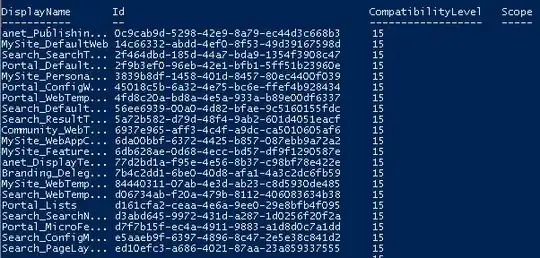
Obviously, I had a lot of orphaned features on my Development Environment

Now you have to find your feature and delete it. You cannot use Id for getting your feature, neither use Unistall-SPFeature cmdlet with Id:

Uninstall-SPFeature : Cannot find a Feature object with Path or Id: a4d208a3-b4fa-4bca-bb34-be4d30156b63 in scope Local farm. At line:1 char:1 + Uninstall-SPFeature a4d208a3-b4fa-4bca-bb34-be4d30156b63 + ~~~~~~~~~~~~~~~~~~~~~~~~~~~~~~~~~~~~~~~~~~~~~~~~~~~~~~~~ + CategoryInfo : InvalidData: (Microsoft.Share...ninstallFeature:SPCmdletUninstallFeature) [Uninstall-SPF eature], SPCmdletPipeBindException + FullyQualifiedErrorId : Microsoft.SharePoint.PowerShell.SPCmdletUninstallFeature

The workaround is to use the DisplayName to get the spfeature (actually SPFeatureDefinition) and then delete it.

$feature = Get-SPFeature | ? { $_.DisplayName -eq "My_Orphane_Feature" }
$feature.Delete()

I have tested this code and it has worked for me.

You can even use this code to clean all the orphaned features:

Get-SPFeature | ? { !$_.Scope } | % { $_.Delete() }

This line of code gets all the orphaned features and removes them.

BUT be extremely careful with this " Get-SPFeature | ? { !$.Scope } | % { $.Delete() }" as in some cases it removed the Farm Features in Central Administration which is a big issue only running the configuration wizard helped.

Anatoly Mironov
  • 5,750
  • 2
  • 29
  • 56
  • 1
    Thanks, just had to use this myself - one dev box, multiple dev branches, not retracting a newer branch before deploying an older one = orphaned features when deploying the old one over the new :( – James Love Nov 11 '14 at 15:10
  • Thanks this worked! Used Uninstall-SPFeature and stsadm -o uninstallfeature but none worked..then finally found your script above and that worked! – Ransher Singh Feb 17 '15 at 15:48
  • What can I do if it is not in the list of features? But it shows in the log... – spankmaster79 Jul 08 '16 at 08:14
  • Thank you! Added this to my "useful scripts" onenote notebook... – FolcoTook May 31 '17 at 16:04
  • BE VERY CAREFUL WITH THIS: These features may show up as orphaned on one server, but not others. Run Get-SPFeature | ? { !$_.Scope } on all servers in your farm before deciding they are orphaned. – Nacht Jun 14 '18 at 04:29
7

To my surprise this worked for me:

stsadm -o uninstallfeature -id <id-of-feature-missing> -force 

Found in this blog post Sharing Minds - by Anthony Butcher

spankmaster79
  • 181
  • 1
  • 3
6

You can try tu use

SharePoint Manager 2010 or

SharePoint Feature Administration and Clean Up Tool

Dragan Panjkov
  • 190
  • 1
  • 2
  • 11
AlexSSE
  • 703
  • 2
  • 6
  • 17
3

I used following command to remove feature from Site Collection Administration : Features interface

stsadm -o uninstallfeature -id <GUID> -force

GUID of feature (which you want to remove) can be found in View Source of page.

Dikesh Gandhi
  • 6,803
  • 4
  • 30
  • 55
3

You can try this and second Reference, this one I have refered fist time.

For this you need the add the Feature Id and then -Force is important. Without force it works sometimes but definitely works with -Force. Hope this will be helpful.

Ram
  • 2,444
  • 2
  • 19
  • 38