Created a list that keep tracks of people signing up for a class. Is there a way I can set a custom list that will not allow anyone to be able to sign-up if it reaches a certain number of people. I was thinking to adding calculated column that will when it reaches a number, but don't know how to set limits or lock from anyone signup if it reaches that number. Does anyone know how or if this can be done in SharePoint 2013?
Asked
Active
Viewed 1,015 times

2 Answers
2
On 2013 CSR and the OnPreRender function is one, and maybe even the best way of skinning this cat.
You will have to read the whole list and then not display the Form but a message.
But you can do without CSR and make SharePoint do half the work for you.
A quick and easy ductape patch from the olden days is to hide the NewForm contents.
- On the NewForm.aspx page add a ListView WebPart, make it list all your items
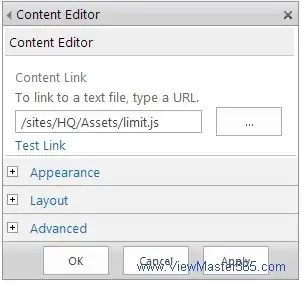
change the WebPart Layouts Properties Zone-Index to 1 to make it display below the NewForm Add another WebPart, use a Content Editor WebPart with the contents:
SP.SOD.executeFunc('sp.js', null, function(){//execute after pageload
    var items = document.getElementsByClassName('ms-itmhover');//all displayed listitems
    console && console.info('There are ',items.length,'in this list');
    if (items.length > 10) {//maximum number of items
        var form = document.getElementsByClassName('ms-formtable')[0];//new form
        GetAncestor(form,'DIV').innerHTML = '<h1>Numbers of records has exceeded the permitted limit: '+items.length+'</h1>';
    } else {//optional: hide the View with all the items
        var itemlist=items[0];//first item
        GetAncestor(itemlist,'DIV').style.display='none';
    }
});
Note: you have to wrap this in a < script>< / script> tag, StackOverflow doesn't display it properly
Tip: place the javascript in a separate file and link the Content Editor Web Part to it.. makes it easier to edit... you still have to include the < script> tag!!

Danny '365CSI' Engelman
- 21,176
- 7
- 35
- 79
-
Thank you Danny. I followed the steps, but its not throwing out the message once the item list reaches over 10 items. I am missing something? – SharePoint Lady Oct 29 '15 at 19:26
-
I have added 1 line. Press F12 (Developer Tools) and check the Console Tab for the output (some JavaScript skills are required to debug whats not making it work for you) – Danny '365CSI' Engelman Oct 29 '15 at 20:04
-
Thanks Danny. I noticed that you added 1 line. I most of chosen an incorrect tag. I will double check. Thanks! – SharePoint Lady Oct 30 '15 at 12:22
1
You could create a workflow with SharePoint Designer or Visio(and import it in SP Designer) where you should be able to set the workflow to wait until you reach the number of records that you want. After that, you continue the workflow by blocking access to that list. Im not sure that you can do it only by Visio or SP Designer. Im affraid that you must create the workflow with powershell, but it can be done.

CatalinIancu
- 41
- 7