Is there any way to catch update/changes in the Datasheet view of a list in JavaScript in SharePoint 2010? I see their are event receivers but nothing in Javascript.
Asked
Active
Viewed 1,601 times

2 Answers
1
The datasheet view was renamed to quick edit in SP2013, removing the ActiveX dependencies and migrating the implementation to html / js.
There is almost no documentation about what you are trying to achieve, but I would give a try to spjeff implementation, who overrides the template implementation:
http://www.spjeff.com/2014/05/17/quick-edit-supports-js-link-and-client-side-rendering/

Xavi
- 168
- 8
-
Sorry. I forgot to mention I need this for SharePoint 2010. – IMTheNachoMan Aug 25 '15 at 12:41
-
1Then I'm sorry too, because in SP 2010 the datasheet view is an ActiveX control, and there is no way you can attach a js event to it: take a look at this – Xavi Aug 25 '15 at 14:08
0
Note:
in June 2017, Microsoft disabled the use of JavaScript in a Calculated Column
That means given answers may not apply for newer SharePoint versions
For long explanation and work arounds see:
June 13th 2017 Microsoft blocked handling HTML markup in SharePoint calculated fields - how to get the same functionality back
Original answer:
http://www.viewmaster365.com/#/Create/SearchFilter
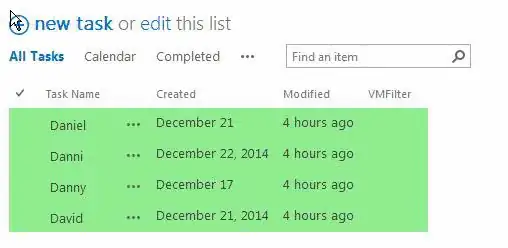
This kinda weird looking code in a Calculated Column set to datatype is Number will attach a KeyUp event to a DOM element above the search box, that way catching each keyup event. If you attach it to each TR (TableRow leave out the 3 parentNodes), it should work in a Datasheet View as well.
    =" <img src=""_layouts/images/blank.gif"" onload=""{"
     & "var TR=this;while(TR.tagName!='TR'){TR=TR.parentNode}"
     & "TR.parentNode.parentNode.parentNode.addEventListener('keyup',"
     & "(function(keyevent){"
     & "this.style.backgroundColor='"
     & [Task Name]  & "'.indexOf(keyevent.srcElement.value)===-1"
     & "?'lightcoral':'lightgreen'"
     & "})"
     & ".bind(TR))"
     & "}"">"
ICC

Glorfindel
- 1,050
- 1
- 11
- 17

Danny '365CSI' Engelman
- 21,176
- 7
- 35
- 79
-
-
SharePoint 2010 accepts this HTML/Javascript in Calculated Columns – Danny '365CSI' Engelman Aug 27 '15 at 08:20