Due to security issue in my SP 2013 DMS portal, I need to hide Upload files using Windows Explorer instead when Uploading document in a Document Library.
Is this possible?The issue is that we have created folders like Confidential and Public.So,if a user uploads a document can view this folder structure in the document library and delete/rename the folders and temper the files and folders.
This is a security hole and it needs to resolved.
Asked
Active
Viewed 1,445 times
2

samolpp2
- 3,530
- 5
- 54
- 97
2 Answers
2
Hiding Upload files using Windows Explorer instead is not the best practice. SharePoint takes care of view permission OOB provided we set it correctly.
SharePoint do not show any item or document to a user who does not have permission to view.
Coming to your case, where in document library you have 2 folders confidential and public. We can set item level permissions on confidential folder which will restrict users from a particular group to view.
Assuming you are on SharePoint 2013, you can follow below steps to set unique permissions on folder. After this user will not be able to see the folder on UI as well as in windows explorer.
1. Go to the document library and select the folder and click on shared with option. Refer below screen shot.

2. A pop up will open, then click on Advanced link.

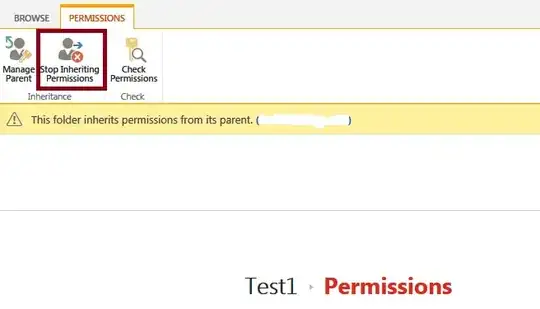
3. You will now navigate to permission settings page, where its noticed that folder is inheriting parent's permission. We need to stop inheriting and set unique permission to a group. Which will ultimately restrict users from that group to view the folder in UI as well as in windows explorer.

Asad Refai
- 5,971
- 8
- 34
- 57
1
Hiding does not resolve a security issue. He can still enter the webdav URL into an Explorer window by itself.
However, if he is able to view and alter the Folders in the Explorer-mode, he does have rights to do so, so he can do the same Thing in many other ways (via the UI or the Client-Object model through Javascript or C#-API)
if that is a security hole, you have to rethink your Architecture and permission structure.

Leopold Lerch
- 1,007
- 5
- 12
-
Thanks for the update.Can you help how to hide this link?Any CSS trick or any Powershell way. – samolpp2 Jun 11 '15 at 09:39
-
you could remove it from ribbon completeley using a Feature with that XML: http://sharepoint.stackexchange.com/questions/43812/how-to-partial-disabling-open-to-explorer-ribbon-action – Leopold Lerch Jun 11 '15 at 09:52
-
However, that´s just hiding, that has nothing to do with preventing the user to do it other ways – Leopold Lerch Jun 11 '15 at 09:53
-
Leopold , the link I am talking about not residing in the Ribbon.Its part of the uploadex.aspx file.i already written the PowerShell for hiding the
Open with Explorericon from the Ribbon and I am able to do that.But this issue is different. – samolpp2 Jun 11 '15 at 10:27 -
1
-
Leopold, can you tell, how can I implement my own uploadex.aspx page?I know I can take the copy of the uploadex.aspx from 15 templates/layuts folder.But I am stuck with , how SharePoint will come to know that when I upload a new document, it has to load
myownUploadEx.aspxpage which has browse, ok buttons etc.? – samolpp2 Jun 11 '15 at 12:41 -
1you can set your own page using web.CustomUploadPage = "/" + SPUtility.ContextLayoutsFolder + "
"; web.update(). – Leopold Lerch Jun 11 '15 at 13:35 -
1
-
1in my specific case I Extended the existing upload-page, if you do one completely on your own, you will have to take care on to which documentLibrary the user wants to upload the file. However, I guess you will be able to get that Information using the SPContext.Current.List or SPContext.Current.ListID properties – Leopold Lerch Jun 11 '15 at 13:39
confidentialfolder in document libraries, then a function with few actions like to identifyconfidentialfolder in doc libs, breakroleinheritance and assign permissions to group will do the job. – Asad Refai Jun 11 '15 at 10:18confidentialwill not be seen. – Asad Refai Jun 11 '15 at 10:26