4

I am trying to set up using a SharePoint 2010 workflow that will count the number of non priority 1 tickets in a custom SharePoint online list. What I would like to have it do is go through the list, if the ticket is priority 1 then it will print the current total into the column. Then, if it is priority 2-5 it will add one to the total and update the total column. It would look something like this

Title     Priority     Total 
Ticket 1     1          0 
Ticket 2     3          1 
Ticket 3     3          2 
Ticket 4     1          2

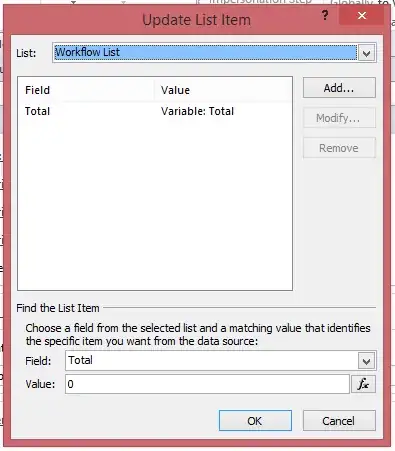
I can't seem to get the workflow to work quiet like that and I was wondering if someone could help. Here is how my current workflow is set up enter image description here
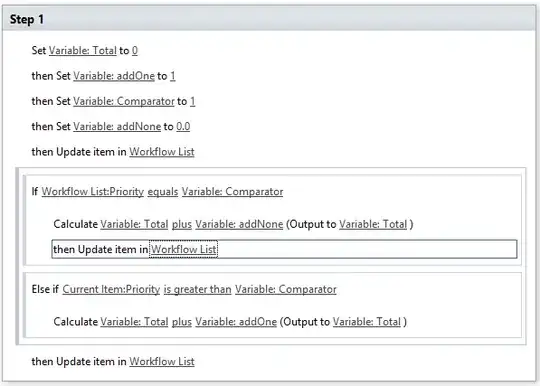
enter image description here

tmarsh
  • 143
  • 1
  • 1
  • 3

1 Answers1

0

You can do this using following logic.

  1. If current item priority = 1. Then get recently modified list item where priority equals one. From that item take the total value and assign it to a variable.

    • Increment value in variable and update current item Total field
  2. Else. Get recently modified list item where priority is not equal to one. From that item take the total value and assign it to a variable.

    • Increment value in variable and update current item Total field
Amal Hashim
  • 28,306
  • 5
  • 31
  • 61
  • 1
    Thank you for the answer it has been helpful, but I don't have any option in SharePoint Designer to get recently modified list items. Do you know if the is a specific action I can use to do that? – tmarsh Apr 18 '15 at 01:26
  • I was just throwing an idea. Next option is to add a hidden field of type Yes/No. And use that field to track the last updated total list item. You can use that in the lookup for getting item. Then set that row to No. And set current item to Yes. Hope you got the idea. – Amal Hashim Apr 18 '15 at 01:33