How to enable team site for an existing publishing site?
Asked
Active
Viewed 1,907 times


2 Answers
5
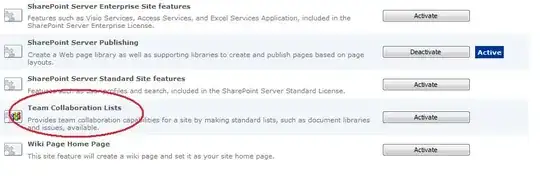
To add the team site components to a publishing site you should enable the "Team Collaboration Lists" feature.

djeeg
- 4,619
- 20
- 33
-
@djeed: I went to the site setting of the site collection and "Team collaboration lists" is not listed – Foo Wong May 18 '11 at 03:49
-
1@Foo Do not go to "Site collection features". Go to "Manage site features" under the "Site Actions" header on the Site Settings page. This feature is not scoped for a site collection. http://msadvisorwl.files.wordpress.com/2010/05/045329b25eca0987e4c83f46c62c4d3a.png – Matt Weimer May 18 '11 at 04:22
0
To turn on publishing for a site when publishing is already turned on for the site collection:
Site Actions > Site Settings > Manage site features
Activate: SharePoint Server Publishing

Laurie
- 5,197
- 1
- 19
- 26