Right now in SharePoint (2013) if a column contains an email address by clicking on it an Outlook window pops up with the To: autofilled with that email address. Maybe the other way round is possible? My questions is, is there is a way to have an Outlook window pop-up but with the To: address empty (for the user to fill) and the Body of the email containing a template with values from the current list item. To be more specific I would like something like " The payment for [Name], which was due on [Due Date] was not recieved".
I tried creating a workflow and creating a ribbon button to start the workflow (email template was easy to create using eg. [%Current Item:Name%]) but the problem is it will not allow an empty To: email address or send to external email addresses. I know there is a solution to send to external email addresses, but they have to be predefined, which is not convinient since they are many and constantly change.
In conclusion can I have a new email form pop-up with list items included and an empty To: address? Any help/solution would be appreciated, or pointing me to the right direction for a solution. Thank you in advance!
EDIT: tried using CSR and JS Link (modified code previously provided by John-o - here )
    RegisterModuleInit('/sharepoint-01/home/department/accounting/period_lists/SiteAssets/jsLinkSendEmail.js', sendOverdueEmail);
sendOverdueEmail();

function sendOverdueEmail() {
    var timeSinceFieldViewCtx = {};
    timeSinceFieldViewCtx.Templates = {};
    timeSinceFieldViewCtx.Templates.Fields = {
        "Send_x0020_Email": {
            "View": timeSinceFieldViewTemplate
        }
    };
    SPClientTemplates.TemplateManager.RegisterTemplateOverrides(timeSinceFieldViewCtx);
}

// Create Onclick Button Function
function timeSinceFieldViewTemplate(ctx) {

    // Variable declarations from SP List
    var vesselName = ctx.CurrentItem.Vessel_x0020_Name;
    var charterer = ctx.CurrentItem.Charterer;
    var nextDueDate = new Date(ctx.CurrentItem.Next_x0020_Due_x0020_Date);
    nextDueDate.setHours(0, 0, 0, 0);

    var ret = ctx.CurrentItem.Body + "<b>" +
    "<button onclick=\"sendEmail(vesselName,charterer,nextDueDate);\">Send Email</button>" + "</b>" ;
    return ret;
}

//
function sendEmail (vesselNameX,chartererX,nextDueDateX){

    //Construct the Email including subject,body
    //var recipient
    var subject = "Payment Overdue";
    var msg = "Good day," + "\n" +
    "we have noted that owners have not received hire for " + vesselNameX +
    "from charterers " + chartererX +
    " . As hire is due since " + nextDueDateX +
    " , please ask charterers to provide bank slip soonest."+ "\n" +
    "Best regards,"+ "\n" +
    "----------------------------------------------------------------------";

    try {
        var objO = new ActiveXObject('Outlook.Application');
        var objNS = objO.GetNameSpace('MAPI');
        var mItm = objO.CreateItem(0);
        mItm.Display();
        mItm.Subject = subject;
        mItm.Body = msg;
        mItm.GetInspector.WindowState = 2;
    }

    catch (err) {
        alert("The following may have cause this error: \n" + "Outlook is not installed on the machine.");
    }

}
But when i click the button nothing happens. In the console (browser) I can see this error:
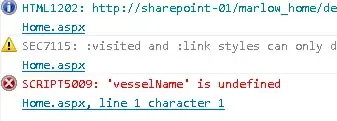
Any ideas? I tried passing ctx as a parameter to sendEmail() and declare my 3 variables in that function but also will give a similar error. Any ideas?


