1

In SharePoint List I need help on below point. Can any one help how to archive this using Client-side rendering (JS Link) in SharePoint :-

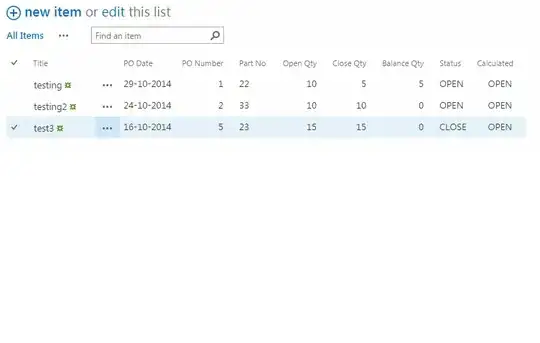
If Balance Qty is not 0 then it should be in RED colour (OPEN) and if Qty is 0 then colour should change from Red to Green (CLOSE). enter image description here

enter image description here

My Screen enter image description here

Vadim Gremyachev
  • 42,498
  • 3
  • 86
  • 167
user3760253
  • 663
  • 5
  • 14
  • 25
  • I am not able to get the question..i assume balance qty is a column in a list and what exactly you mean by open and close ? When it should happen ? – Arvi Oct 28 '14 at 06:56
  • Thanks Arvind to looking into this issue. If Balance Qty is equal to Open Qty then it will be close and if Balance Qty is less than open Qty then it will be open. Hope this will be clear. So here Status (Close or Open) should be change automatic when user enter the data in Balance Qty. – user3760253 Oct 28 '14 at 07:06

2 Answers2

2

I would probably do this in two steps...

EDIT: Update based on further conversation with OP in chat -- modified answer to affect two fields and handle MDS

  1. Create a calculated column that follows your rules to calculate if a PO should be 'OPEN' or 'CLOSED' The formula for the calculated Status column could be something like: =IF(NOT([Balance Qty]=0), "OPEN", "CLOSED") Using a calculated column, you can do other things later like sort/filter by open or closed POs in list views.

  2. Next I would use JSLink Client-Side Rendering to color-highlight your status field when it appears in a list view... I'm assuming you have named the calculated column "Status"

Save this code as a JS file and put it somewhere you can get to it (I saved it as a file called statusHighlighterCsr.js and put it in my site's Asset Library):

// SharePoint Online Automatically uses MDS, so we'll setup our custom rendering
// to play nicely
RegisterModuleInit('/Testing/SiteAssets/statusHighlighterCsr.js', registerStatusHighlighter);
// this will call the rendering function though in case MDS doesn't apply
registerStatusHighlighter();

function registerStatusHighlighter() {
    var statusHighlighterCtx = {};
    statusHighlighterCtx.Templates = {};
    statusHighlighterCtx.Templates.Fields = {
    // Each key value in this object should be the field name
    // so spelling and case matter and should match your list
        "Status": {
            // Each key here should be the view/form you want to use
            // this custom rendering, choices include: 'View', 'DisplayForm',
            // 'EditForm', 'NewForm'. The value should point to the function \
            // that will actually perform the rendering, which we will define 
            // below -- outside of this function.
            "View": statusHighlighterTemplate
        },
        "Order_x0020_Status": {
            "View": openHighlighterTemplate
        }
    };
    SPClientTemplates.TemplateManager.RegisterTemplateOverrides(statusHighlighterCtx);
}

function statusHighlighterTemplate(ctx) {
    // you access the current list item properties with ctx.CurrentItem
    var currItmStatus = ctx.CurrentItem.Status,
        returnNode = document.createElement('span');
    returnNode.appendChild(document.createTextNode(currItmStatus));
    returnNode.style["font-weight"] = "bold"
    if (currItmStatus == "OPEN") {
        returnNode.style.color = "red";
    } else {
        returnNode.style.color = "green";
    }
    return returnNode.outerHTML;
}

function openHighlighterTemplate(ctx) {
    // for the Open Status Field rendering
    var currItmOrdered = ctx.CurrentItem['Open_x0020_Status'],
        returnNode = document.createElement('span');
    returnNode.appendChild(document.createTextNode(currItmOrdered));
    returnNode.style["font-weight"] = "bold"
    if (currItmOrdered == "ORDERED") {
        returnNode.style.color = "green";
    } else {
        returnNode.style.color = "red";
    }
    return returnNode.outerHTML;
}

Note: this is all just standard JS, so no jQuery references required on the page with your list view.

Watch out for a common issue when adding the file to your list view's JSLink property, it expects a URL token like the ones listed here instead of a normal URL... I used a file called statusHighlighterCsr.js that I put in my asset library... so my URL token looks like:

~site/SiteAssets/statusHighlighterCsr.js

That should get you going, I have another answer about JSLink that you can find here with some more information.

John-M
  • 5,930
  • 3
  • 18
  • 36
  • Thanks John,For first option I tried but its not showing the proper result. I created below column in SharePoint Online List, create one more column Calculated (With Calculated Type) and given your provided formula then I enter all data manually Open Qty, Close Qty, Balance Qty (All Manually), Status. Here after entering Balance Qty status is not changing in both column Status or Calculated. Please advice. – user3760253 Oct 28 '14 at 18:58
  • I've added the screen upside as here not able to attach it.Thanks. – user3760253 Oct 28 '14 at 19:03
  • 1
    Ok I re-read your conditional... what I think you need is =IF(NOT([Balance Qty]=0), "OPEN", "CLOSED") and I've also modified the JS to reflect the correct color for each choice – John-M Oct 28 '14 at 19:36
  • Thanks John for your help and support.Its work perfectly. Now I'll check the second part and let you know.:) – user3760253 Oct 28 '14 at 20:01
  • Hi John, I tried your above js script. But not sure If I'm missing some steps to upload the js file in proper manner. Please find my stpes :- 1)Save the file with same name in Asset Library. 2) In SharePoint Edit the WebPart Properties,In Miscellaneous - JS Link - added by link (~Testing/SiteAssets/statusHighlighterCsr.js), 3) Apply and Ok. But color changes are not reflecting. Not sure If I'm missing some steps. – user3760253 Oct 29 '14 at 10:35
  • Don't replace anything in the URL token, it's a value taht SharePoint replaces when it loads the page -- just use ~site/SiteAssets/statusHighlighterCsr.js without modifying – John-M Oct 29 '14 at 12:13
  • Hi John, It's working fine now but when I'm opening the page the colors are showing normal once I refresh the page then colors are reflecting. So here color will change only when I refresh the page (: – user3760253 Oct 29 '14 at 12:41
  • I'm using Google Chrome. – user3760253 Oct 29 '14 at 16:20
  • Hi John, Have Question about URL. For Example in my current custom list web part I've give below URL which has saved in Asset Library (provided by you). Now for another web part I'm going to add/save one more js file which have different requirement. Now what link/url I've to give for this webpart. Because If I'm giving JS file URL path (where file is saved) its not showing color changes only if I'm giving URL:- (~site/SiteAssets/statusHighlighterCsr.js) then changes is reflecting. So if there is multiple JS file in Asset Library for different webparts how to provide the url for all. – user3760253 Oct 31 '14 at 09:10
  • You should just be able to use ~site/SiteAssets/<fileName>, replacing <fileName> with the actual name of the file in your library for any valid file in your library. You should probably change the function names in each file, so they have less of a chance of colliding when loaded into the browser. If you have more questions, you should probably ask it as a new question on the site, that way you're more likely to get the entire community looking at and get a faster response -- good luck! – John-M Oct 31 '14 at 12:06
  • Thanks John for the information. Now if I have any doubts I'll ask in new post.:) – user3760253 Oct 31 '14 at 12:28
2

There is a simple but a little bit tricky solution for this task.

Steps:

1) Create a calculated column named Status

2) Specify the following formula:

="<span style='color:" & IF(NOT([Balance Qty]=0),"red'>OPEN","green'>CLOSED") & "</span>"

It is assumed that Balance Qty column exist

and set (important) Data Type to Number or Currency or Date and Time as shown on figure below

enter image description here

Result

enter image description here

Filtering and sorting

Since Status column represents a html value, i would recommend to create an additional calculated column, let's say StatusText to perform filtering/sorting operations

StatusText calculated column formula:

=IF(NOT([Balance Qty]=0), "OPEN", "CLOSED")

Another option would be to utilize source column, in your case Balance Qty to perform filtering/sorting operations by status.

Danny '365CSI' Engelman
  • 21,176
  • 7
  • 35
  • 79
Vadim Gremyachev
  • 42,498
  • 3
  • 86
  • 167
  • Hi Vadim, Here after saving the data its showing perfect but when I'm trying to filter the status with OPEN or CLOSED its showing the formula instead of OPEN/CLOSED option. – user3760253 Oct 29 '14 at 06:23
  • The answer has been updated, see Sorting and filtering section. – Vadim Gremyachev Oct 29 '14 at 07:30
  • Thanks Vadim, I created new column Status Text and its working. But in this List two column for the same value Status (one for filtering one for color status) is looking odd. It will be good if I can use same column for sorting/filtering. Any Idea If I can hide html value and able to filter base of OPEN/CLOSE in status column itself. Thanks. – user3760253 Oct 29 '14 at 07:50
  • Sure, just go to Modify View settings and select/un-select the fields you would like to be visible in List View – Vadim Gremyachev Oct 29 '14 at 07:55
  • Here I want to show both, one for filter and one for color but both in one because I'm sure client will not accept two different column for this. Please advice – user3760253 Oct 29 '14 at 08:00
  • I've added my screen shot above where Open and Closed showing two times. However It will be good if in only one status column user can do filter open and close with these two colors.Thanks – user3760253 Oct 29 '14 at 08:11
  • I Get column value as "OPEN" . The SPAN tags are not getting resolved. – Arvi Oct 29 '14 at 08:44
  • @user3760253, my idea of creating an additional column named StatusText was to use it for filtering and sorting purposes, while Status column should be used for presentation purposes since it is html field. Basically Status and StatusText are same field, but one is html value and another one is text value. – Vadim Gremyachev Oct 29 '14 at 08:49
  • The visibility of columns is determined by View settings, you could hide/show any fields you will on that page – Vadim Gremyachev Oct 29 '14 at 08:53
  • 1
    @mparvind, have you followed the instructions i have provided? Looks like you forgot to specify the proper field type – Vadim Gremyachev Oct 29 '14 at 09:01
  • Yes Vadim I understand solution which you have provided. I need to use two views. one (Status) is for presentation purpose and second (Status Text) for filtering purpose.Right? But I thought if it will work in one view (Presentation + Filtering ) then no need to change or select the view from user side he can do both activity in one screen. Again thanks for your advice and guidance.:) – user3760253 Oct 29 '14 at 09:12
  • Vadim, One Question. For (Status or StatuText = Open) column can I get weekly alert consolidated mail for all the Item which is in Open Status. It will be helpful if you provide some steps or link. – user3760253 Oct 29 '14 at 11:47