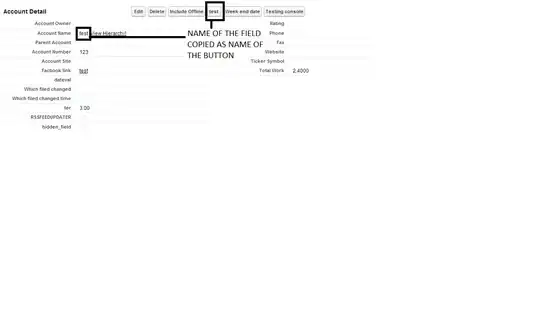
I want to add a custom button to the Quote object where the label of the button changes based on the value of a custom field on the record. I want the label change to occur when the page is rendered without requiring user to click.
Is this possible?
I want to add a custom button to the Quote object where the label of the button changes based on the value of a custom field on the record. I want the label change to occur when the page is rendered without requiring user to click.
Is this possible?

This is possible, Way back a great wizard @user320 answered one of the questions which has been my favorite tricks ever in my salesforce experience: Changing the color of a custom button
Applying the same trick I get the ID of the
Account name field
After a lot of help from @eyescream I simplified my JS to get the jquery below.
find the name of the button and the ID of the field that you want to copy over to the button and just replace the name = and j$('#') part in the below jquery :)
var j$ = jQuery.noConflict();
j$(document).ready(function(){
       //newb = name of the button and #acc2_ileiner = id of the custom field
       j$('[name="newb"]').val( j$('#acc2_ileinner').text().replace('[View Hierarchy]', ''));
    });
I encoded this to base64 and pasted it in my button code:
Note: To use this hack, create a custom detail page button and choose 'Execute JavaScript' for Behavior and 'OnClick JavaScript' for Content Source. In the formula editor for your new button we first need to load some jQuery resources with the following REQUIRESCRIPT lines
Refrence: http://blog.scottmcclung.com/2014/01/hack-together-jquery-modal-popup-in.html

RESULT :