I installed Force IDE in my Eclipse. But all the code are opened in text editor. I tried open with > other editors and apex editor is still not there. Therefore I can't get the keywords highlighted or get the intelligent pop-ups. Is there any way I can resolve this?
Asked
Active
Viewed 1,745 times
1

-
1Have you tried MavensMate? – Boris Bachovski May 26 '14 at 00:32
-
I remember in Eclipse there are settings for the editors as well as assigning which is default editor for each file extension. I can't remember where exactly this was from top of my head but check the eclipse settings/preferences. – Boris Bachovski May 26 '14 at 00:43
-
1No. I just looked at the website. Seems it is based on text editors so must be very different user experience from Eclipse based IDE. I will give it a try later. – Lance Shi May 26 '14 at 00:43
-
Different experience is right. IMO it's a VASTLY improved experience ;) – Matt Lacey May 26 '14 at 01:14
-
Okay, since you guys are far better developers than I do, I will take your advice and try that. – Lance Shi May 26 '14 at 01:19
2 Answers
4
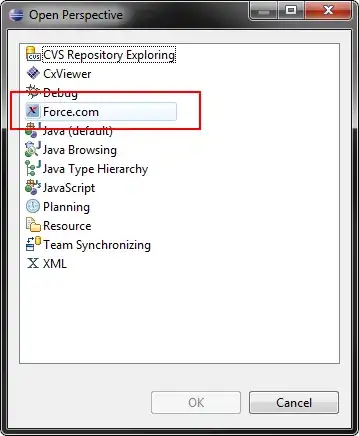
It's been awhile since I've used Eclipse as my Force.com IDE, but I think you want to open the Force.com perspective.
Windows > Open Perspective > Other. Force.com

Daniel Ballinger
- 102,288
- 39
- 270
- 594
-
I did it, but it still didn't fix for me. Since everybody is recommending Mavensmate, I will give it a try and see how it goes. – Lance Shi May 26 '14 at 01:21
-
Mavens is definitely the better option. That what I'm using day to day. – Daniel Ballinger May 26 '14 at 02:06
4
The Force IDE does have an Apex editor.
If you go to "About" and click on the salesforce.com icon and then "Plug-in Details" you should see the "Force.com IDE Editors" plug-in listed.
The Apex editor is associated by file extension (so the "File Associations" should get set automatically on installation) and so should be available whatever the perspective:
<!-- apex class/trigger editor -->
<editor
    id="com.salesforce.ide.ui.editors.apex"
    class="com.salesforce.ide.ui.editors.apex.ApexCodeMultiPageEditor"
    contributorClass="com.salesforce.ide.ui.editors.apex.ApexActionContributor"
    default="true"
    extensions="cls, cls-meta.xml, trigger, trigger-meta.xml"
    icon="icons/appExDevIco16.png"
    name="%editor.name.ApexCode">
        <contentTypeBinding contentTypeId="com.salesforce.ide.core.contentType.class" />
        <contentTypeBinding contentTypeId="com.salesforce.ide.core.contentType.trigger" />
</editor>
so presumably the problem is that your installation has failed in some way.
Perhaps the Force IDE will recover some of its lost ground when eventually it moves to using the newer APIs - see Force.com IDE - any news on the "after the refactor version"?.


-
Thank you for this. I looked at the list - and Force.com IDE Editors is not there. So I guess there is something wrong with my installation. – Lance Shi May 26 '14 at 07:57