I am using datatable plugin in a visualfroce page. Below warning popsup only at the time of page loading and table looks good after closing the alert.
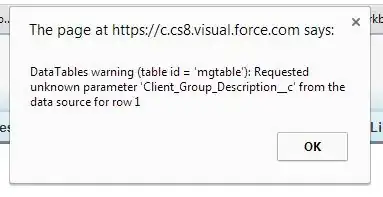
Here is the code...
VisualForce Page
$('#mgtable').dataTable({
           sPaginationType: "full_numbers", "bJQueryUI" : true,"sDom": '<"H"lfr>t<"F"ip>',
           "aoColumnDefs": [
               { "aTargets":[ "mgName" ], "mData": "Name",sClass:"Name", "bAutoWidth": false },
               { "aTargets":[ "gcb" ], "mData": "CreatedBy.Name", sClass:"CBName", "bAutoWidth": false },
               { "aTargets":[ "desc" ], "mData": "Client_Group_Description__c", sClass:"CGDesc", "bAutoWidth": true }
           ],
          "fnInitComplete": function(oSettings) {
                  MasterDetailListController1.refreshMasterGroupList(function(result, event){
                     if(event.type == 'exception') {
                        alert(event.message);
                     } else {
                       $('#mgtable').dataTable().fnAddData(result);
                     }
                   });
           }

    });

    <table id="mgtable" class="display">
        <thead>
            <th class="mgName">Master Group Name</th>
            <th class="gcb">Group Created By</th>
            <th class="desc">Description</th>

        </thead>
        <tbody></tbody>
    </table>
Apex Controller
public with sharing class DataTableController {

  @RemoteAction
  public static list<Client_Group__c> refreshMasterGroupList() {


    return [select id,Name,CreatedBy.Name,Client_Group_Description__c from Client__c order by Name];


    }


Client_Group_Description__c? I've seen similar errors and it usually had to do with bad data in the column(s) which caused a problem when the plugin serialized the data and stored it in its internal structures. – Mark Pond Apr 18 '14 at 16:47