When you click on the Opportunities tab, (assuming you haven't modified standard salesforce layout), you see a "Recent Opportunities" list. At the top of the list, there is a "New" button.
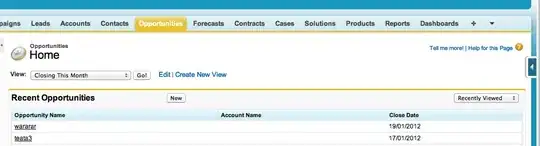
Is there a way to hide the "New" button displayed on this page? I have tried disabling the button on the "Opportunity List View" Search Layout[Setup -> App Setup -> Opportunities -> Search Layouts], but it does not remove the button from this particular view.


Sfdc.onReady(function), you also havesfdcPage.appendToOnloadQueue(function)at your disposal. – Mark Pond May 28 '13 at 22:07