31

I have tested the new Summer '13 System.scheduleBatch method in a DE org and am wondering if I have misunderstood its usage. My principle reason was because I wanted to know if it would allow me to run more than 5 Batch jobs concurrently (wishful thinking) but secondary that it would queue them up successfully, so I built my test:

System.scheduleBatch( new AccountBatchJob(), 'test1', 0, 1);
System.scheduleBatch( new AccountBatchJob(), 'test2', 0, 1);
System.scheduleBatch( new AccountBatchJob(), 'test3', 0, 1);
System.scheduleBatch( new AccountBatchJob(), 'test4', 0, 1);
System.scheduleBatch( new AccountBatchJob(), 'test5', 0, 1);
System.scheduleBatch( new AccountBatchJob(), 'test6', 0, 1);

5 jobs ran concurrently, which is what I expected tbh. I was expecting that since I didn't have resources, test6 would remain queued. Not so, it disappeared into the ether!

So, I figured that it must have got confused because I had all 6 to start immediately so I changed my test to:

System.scheduleBatch( new AccountBatchJob(), 'test1', 0, 1);
System.scheduleBatch( new AccountBatchJob(), 'test2', 0, 1);
System.scheduleBatch( new AccountBatchJob(), 'test3', 0, 1);
System.scheduleBatch( new AccountBatchJob(), 'test4', 0, 1);
System.scheduleBatch( new AccountBatchJob(), 'test5', 0, 1);
System.scheduleBatch( new AccountBatchJob(), 'test6', 1, 1);

Again, 5 run concurrently and nicely queues test6 in Schedule Jobs to start in one minute. I expected that in 1 minute, test6 still wouldn't have resources and would wait nicely until there were as the release notes state:

• When you call Database.scheduleBatch, Salesforce schedules the job for execution at the specified time. Actual execution might be delayed based on service availability.

Since my service availability would have been 0, this implies that it would have waited until such a time that there was a slot free. However, it's been 30 minutes now and still no dice.

This being the case, I'm struggling to see a valid use case for this function (it's certainly not what I hoped it would be).

My question is, has anyone successfully managed to get this function to queue batch jobs so that when resources are not available it waits until they are? If so, what have I missed?

Thanks

Update: Salesforce support are telling me that the 6th job did actually run, but gave a limits exception because 5 other jobs are still running. They've asked me to reproduce in another org so I've just finished that to witness the same behaviour. I'm just really waiting for them to tell me what I already know.

Update 2: Eventually got to speak to backline support who tell me that the purpose of System.scheduleBatch was to remove a layer of complexity so that devs don't have to create an intermediary class that implements Schedulable and then calls Database.executeBatch. However, as I explained to him, that renders System.scheduleBatch completely useless because without the intermediary class, you can't check if there are enough batch slots free. He's escalating internally.

Phil Hawthorn
  • 16,718
  • 3
  • 46
  • 74
  • I notice that you are passing 0 to the minutesFromNow parameter. The docs say 'This argument must be greater than zero'. Perhaps they are defaulting to 1 behind the scenes? In which case all 6 jobs run at the 1 minute mark and hit the limit. – Daniel Ballinger Jun 14 '13 at 00:00
  • 1
    Another thought, capture the CronTrigger Ids that are returned from each call to scheduleBatch and then monitor the State etc as they run. – Daniel Ballinger Jun 14 '13 at 00:05
  • 1
    Yup, tried it with a 1 too - test6 always disappears. It seems to me that if there aren't resources when the scheduler starts your job, you're out of luck. I'm going to log a case with SF I think. – Phil Hawthorn Jun 14 '13 at 06:44
  • @PhilHawthorn do you have any updates from Salesforce on this? – Andrew Fawcett Jun 27 '13 at 00:30
  • Not just yet @AndrewFawcett, I've re-created in a new org as asked but they've gone quiet on me. Will chase again today. – Phil Hawthorn Jun 27 '13 at 06:35
  • Nice question! I would be interested in Salesforce's response to your query. – Anup Jul 10 '13 at 09:56
  • 2
    Hi @Anup it's a shame Salesforce don't have a nice answer. I am currently trying to speak with the product manager in this area, back line support have informed me that the intention for this is simply to remove the need to have an intermediary class that implements the Schedulable interface, but it does not check for available resources. My argument is that this effectively renders it useless to any process that must run because if all 5 batch slots are used, the job simply disappears. At this moment, I don't see that System.scheduleBatch is usable in a production environment for my usage. – Phil Hawthorn Jul 10 '13 at 10:07
  • @PhilHawthorn, great follow up! Can you post your findings and that it won't work for your use-case in an answer? – Matt K Jul 16 '13 at 17:17
  • Is there some reason you can't daisy-chain the batches? – sfdcfox Jul 19 '13 at 19:11
  • @sfdcfox yes you can daisy chain batches but that would not give me what I need. – Phil Hawthorn Jul 20 '13 at 09:04
  • Out of curiousity, why not? – sfdcfox Jul 20 '13 at 15:36
  • So if I want a job to run in an hour (and guarantee it runs), daisy chaining won't help me. The code above is just to illustrate a point, i don't actually want to run 6 jobs at once. – Phil Hawthorn Jul 20 '13 at 17:29

3 Answers3

17

After finally speaking to someone in Salesforce support who seemed to know what my point was, it was explained to me:

'Actual execution might be delayed based on service availability' means that the batch is enqueued for the interval initially set from the scheduleBatch method. 'Service availability' is not a reference to the concurrent batch count freeing up. This feature was not designed to manage the limit in question.

The rep also went on to explain that System.scheduleBatch was provided only to remove the necessity to have an intermediate class that implements the Schedulable interface and calls Database.executeBatch().

So, on that basis the documentation might better state:

• When you call Database.scheduleBatch, Salesforce schedules the job for execution at the specified time. Actual execution might be delayed based on service availability, and if at that point of execution, there are no concurrent batch slots available, the job will not run at all (ever), nor will you be notified that it hasn't run.

This is not acceptable for my usage and I will not be able to make use of this function when a batch job absolutely must run, for this I will continue to use my own tried and tested pattern :)

Phil Hawthorn
  • 16,718
  • 3
  • 46
  • 74
8

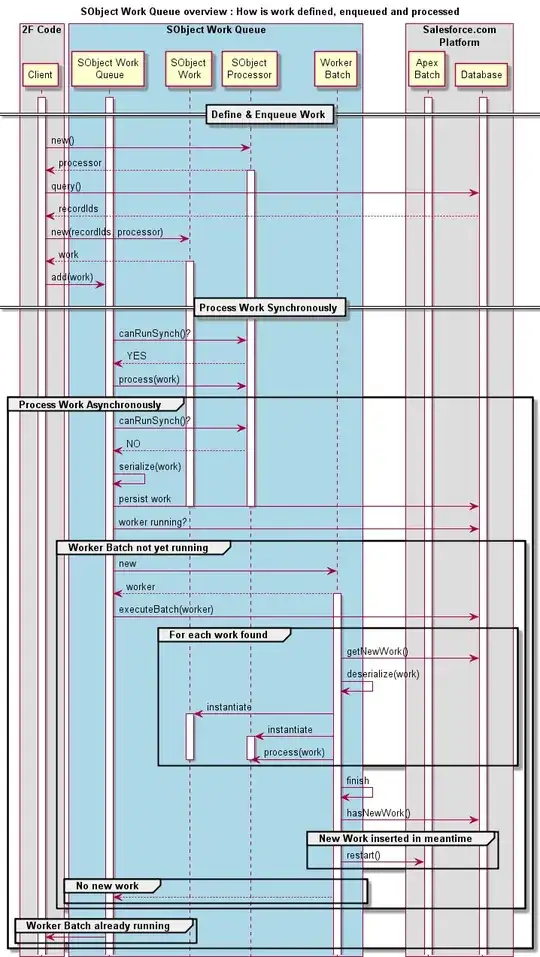
@Phil Hawthorn: I also expected this new method to help us circumvent the Max 5 batch Limit and experienced the same frustration. I party solved this by creating a custom batch queue using database serialization. To invite other to provide feedback and collaborate on such a custom Apex queue I created the GitHub project SObject Work Queue which had the following design goals:

  • Must prevent Max 5 batch in parallel limit - We should never run into this limit with work that is processed over the queue.
  • The queue needs to be so generic that "work" on any type of database object needs to be enqueued.
  • Any type of modification of database objects need to be possible. This should be transparently handled by the queue.
  • Provides better error diagnostics like Batch. Knows last successful Id, full stacktrace and sends email to developers.
  • Secures data integrity like Batch or better. Failures should not leave data in inconsistent state or user of the infrastructure should be able to handle them.
  • Optimistic locking : Instead of locking all many records we do not to process work on Ids that have other work already scheduled.
  • Work that can be run synchronously, should not be queued and processed asynch.

Here is an overview sequence diagram that shows how work is defined, enqueued and processed in such a custom Apex Queue:

enter image description here

Robert Sösemann
  • 37,622
  • 26
  • 165
  • 495
  • 1
    I like it, good luck with your project - I really do wish Salesforce would provide a solution for this. Ultimately, I believe they will have to, to support the more complex enterprise applications emerging on the platform. – Phil Hawthorn Nov 18 '13 at 10:44
1

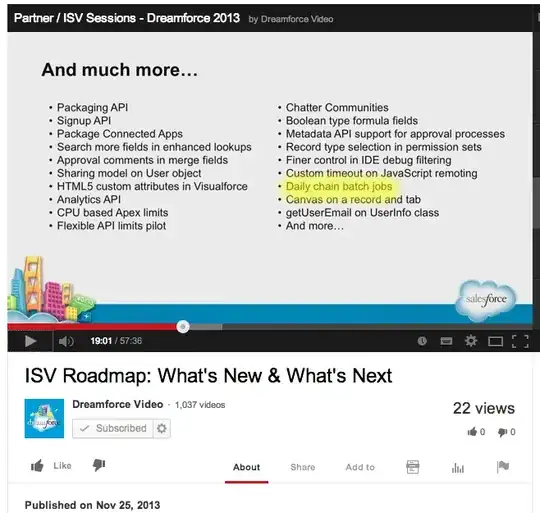
@PhilHawthorn: Maybe not an answer but worth sharing. Just watched the replay of a Dreamforce '13 ISV Roadmap session and saw this in their roadmap:

Daily Chain Batch jobs

I hope this just is a typo for "Daisy chain".

enter image description here

Robert Sösemann
  • 37,622
  • 26
  • 165
  • 495