Although not automatic, it should be pretty straightforward to re-use the shelf object from this AWS RoboMaker world by simply re-using its meshes to create a Shelf.proto file in your local protos folder:
#VRML_SIM R2023a utf8
# A shelf.
PROTO Shelf [
  field SFVec3f    translation 0 0 0
  field SFRotation rotation    0 0 1 0
  field SFString   name        "shelf"
  field SFBool     locked      FALSE            # Is Solid.locked.
]
{
  Solid {
    translation IS translation
    rotation IS rotation
    children [
      CadShape {
        url "https://raw.githubusercontent.com/aws-robotics/aws-robomaker-small-warehouse-world/ros1/models/aws_robomaker_warehouse_ShelfD_01/meshes/aws_robomaker_warehouse_ShelfD_01_visual.DAE"
      }
    ]
    name IS name
    model "shelf"
    boundingObject Mesh {
      url "https://raw.githubusercontent.com/aws-robotics/aws-robomaker-small-warehouse-world/ros1/models/aws_robomaker_warehouse_ShelfD_01/meshes/aws_robomaker_warehouse_ShelfD_01_collision.DAE"
    }
    locked IS locked
  }
}
Here is what it looks like in Webots:
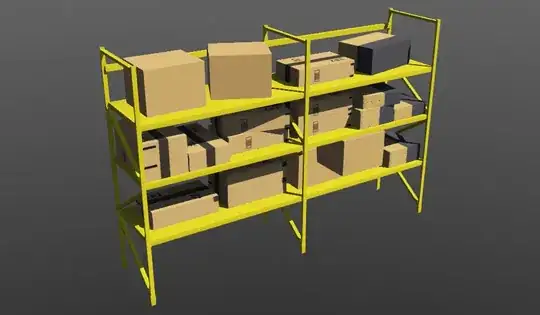 Here is the
 sample.wbt world file showing it in Webots:
#VRML_SIM R2023a utf8
EXTERNPROTO "webots://projects/objects/backgrounds/protos/TexturedBackground.proto"
EXTERNPROTO "webots://projects/objects/backgrounds/protos/TexturedBackgroundLight.proto"
EXTERNPROTO "../protos/Shelf.proto"
WorldInfo {
}
Viewpoint {
  orientation -0.11384659601330234 -0.3187749829101217 0.9409683644240309 5.557715208500585
  position -5.776529177279546 4.724710358949437 2.980453565305262
}
TexturedBackground {
}
TexturedBackgroundLight {
}
Shelf {
  rotation 0 0 1 1.5708003061004252
}
You can also view it in 3D online on webots.cloud.
Note: Using meshes for the bounding object is not optimal, especially in this case where the bounding object could be replaced with a compound object made up of simple boxes, e.g., using a Group node that contains a series of Transform nodes containing a Box node in their Shape node.
Disclaimer: I am a Webots developer working at Cyberbotics.


