This is "AWS + Robomaker" question, not robotics. https://meta.stackexchange.com/a/141944/166296 suggests superuser.com for AWS + personal usage like mine, but I still think robotics site is more appropriate as the tutorial that my question is based on is taken from robomaker. I'm happy to move the question if there's better places.
What am I missing to get the tutorial working?
Issue
In a tutorial Build and Simulate Robotics Applications in AWS Cloud9 amazon.com, published 2022/08/19), I get stuck at the step 16.
Building the Amazon EC2 Instance"
- Once you have configured the automation, select Execute at the bottom right of the screen to begin the automation.
Error reads (creds are swapped):
Value (arn:aws:ec2:us-east-1:292993933939:instance/i-0a0f99abeea700e54) for parameter iamInstanceProfile.arn is invalid. Invalid IAM Instance Profile ARN (Service: AmazonEC2; Status Code: 400; Error Code: InvalidParameterValue; Request ID: 9e4cdad7-9a7a-40a3-9864-3301a998319e; Proxy: null)
Things I tried but didn't seem to help
Assuming the error message is saying that the ARN is incorrect, I've tried various ARN, none of which even returned a different error message.
arn:aws:ec2:us-east-1:292993933939:instance/i-0a0f99abeea700e54arn:aws:ec2:us-east-1:292993933939:instance/robomaker_test1(EC2 instance' name)arn:aws:ec2:us-east-1:292993933939:instance/*(referring https://stackoverflow.com/a/59371263/577001)arn:aws:ec2:us-east-1:292993933939:instance/0a0f99abeea700e54
Maybe related finding in the tutorial
Prerequisites
- To find your custom public SSH key, navigate to the AWS Cloud9 console (https://us-east-1.console.aws.amazon.com/cloud9/home?region=us-east-1#).
I think this is the point where the instructed step and what I see on the same link starts looking different.
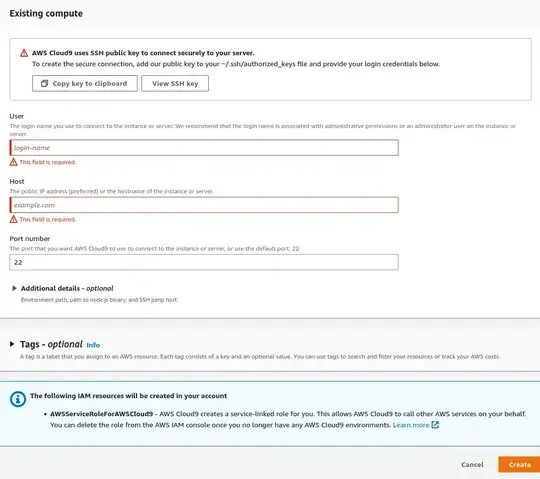
- I do NOT see step "18. Select Create and run in remote server (SSH connection) underneath Environment type." and step 19 on my AWS gui.
- And I see some other required fields that I have no idea what I should put in (see screenshot below). Completely out of idea, I tried to refer to the public host name of an EC2 instance I'm running but no good.