8

I'm running a 64-bit MS Windows 7 with all updates installed. About 1 or 2 weeks ago I've noticed that whenever I restart the OS, the virtual memory pages (of whatever process), corresponding to system libraries like ntdll.dll and kernel32.dll are slightly different.

I'm not talking about the base address of the loaded modules, because I know that changes due to ASLR. I'm talking about the actual contents of the loaded modules, which as far as I know was not affected by ASLR implementations on Windows.

To illustrate what I mean, let me show you the following screenshot that compares 2 binary instances of ntdll.dll captured before (top-half) and after (bottom-halt) one OS restart: enter image description here
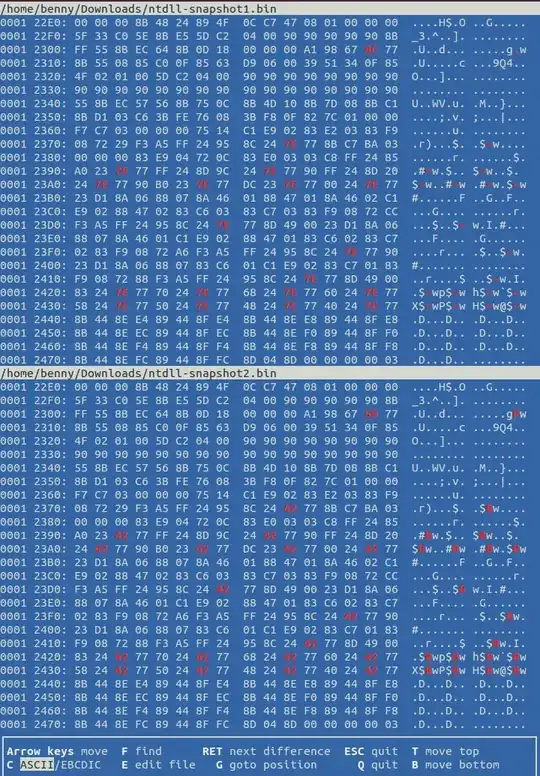
The picture shows just a small part of ntdll.dll and therefore just a few differences. However, there are more. The size of these DLLs don't change, only some bytes at particular locations.

I obtained the 2 binary instances which are compared in the previous picture using Process Hacker like so:

  • Right-click a process and select Properties
  • Go to the Memory tab and scroll-down until you find several entries having the name: ntdll.dll: Image (Commit)
  • Double-click one of these entries (I chose the one that had 856kB)
  • Press the Save... button to store the contents to a binary file on the HDD.

Question 1: What is causing these bytes to change?

  • Sub-question 1.1: Is is some sort of protection mechanism?
  • Sub-question 1.2: Was it recently introduced?
  • Sub-question 1.3: Can it be disabled?

Question 2: What do these changing bytes represent in the code of the DLLs?

Benny
  • 828
  • 7
  • 18
  • 1
    Run dumpbin /relocations ntdll.dll and compare the listed addresses against the changes. – Igor Skochinsky Mar 18 '14 at 13:53
  • @IgorSkochinsky I did run dumpbin as you indicated and compared the listed addresses against the changes. As a matter of fact it seems that no relocations were applied on ntdll.dll. And the changes that are visible in my picture are due to the system DLLs being linked with /DYNAMICBASE – Benny Mar 20 '14 at 12:59

2 Answers2

7

Question 1: What is causing these bytes to change?

These appear to be standard relocation fixups applied based on the DLL's Relocation Table.

Sub-question 1.1: Is is some sort of protection mechanism?

No.

Sub-question 1.2: Was it recently introduced?

No.

Sub-question 1.3: Can it be disabled?

Not easily, no.

Question 2: What do these changing bytes represent in the code of the DLLs?

Addresses.

Jason Geffner
  • 20,681
  • 1
  • 36
  • 75
  • Thanks for your answer. Would you be so kind as to also mention the addresses of what change? Is it the addresses of all functions or just some? – Benny Mar 18 '14 at 14:02
  • 2
    It's not just for function addresses; it also applies to global variable addresses, etc. Simply put, any time the code or data references a virtual address instead of a relative virtual address, that reference needs to have a Relocation Table entry. See Sections 4.2 and 5.6 of http://download.microsoft.com/download/9/c/5/9c5b2167-8017-4bae-9fde-d599bac8184a/pecoff_v83.docx – Jason Geffner Mar 18 '14 at 14:15
  • Thanks for clarifying that. One last question regarding this issue: is there a win32 API which can map/convert all the VAs to RVAs of a mapped image file? Or is this a question for stackoverflow? – Benny Mar 18 '14 at 14:32
  • No API needed... VA - Image Base Address = RVA (since the "Relative" part of "RVA" is relative to the Image Base Address). – Jason Geffner Mar 18 '14 at 14:35
  • Sure, I got the point, however, I need to known where all VAs are located inside the image file in order to subtract the base address. And I was wondering if there is something more efficient than checking whether the value obtained by subtracting the image base address from every DWORD in the image file is greater than 0 and smaller than the module size. Thanks again – Benny Mar 18 '14 at 14:49
  • Just parse the Relocation Table. – Jason Geffner Mar 18 '14 at 14:51
  • It seems that parsing the relocation table is not very common. Do you happen to know of any code which does this? What I have right now is: PIMAGE_NT_HEADERS imageNtHeaders = ImageNtHeader((PVOID) moduleBase); IMAGE_SECTION_HEADER *imageSectionHeader = ImageRvaToSection(imageNtHeaders, (PVOID) moduleBase, imageNtHeaders->OptionalHeader.BaseOfCode); However, the imageSectionHeader->NumberOfRelocations field is always 0. I expected it to be equal to the number of byte changes in my binary diff. Do you have any advice other than to read the document which you provided above? – Benny Mar 19 '14 at 14:36
  • 1
    The code you posted in your comment above is not using the Relocation Table. Please refer to the PE COFF document to which I linked above, and ask further software development questions on http://stackoverflow.com/ – Jason Geffner Mar 19 '14 at 14:44
  • @Benny, check out the 'PerformBaseRelocation' function in this code, https://github.com/fancycode/MemoryModule/blob/master/MemoryModule.c You can see how it parses the relocation table in that function. – shebaw Mar 26 '14 at 05:44
3

What you see is offsets modified to reflect a changed base address. Anything that's not relative to the base (be it global variables or calls or whatever) needs to be adjusted if the image base changes.

PE files can have a relocation table for that. Can, as in standard .exe files usually don't have it, as it was not necessary until ASLR (random base addresses for modules) came along.

For DLLs the base address is likely to change as it depends on what other files are already loaded so they almost always have a base relocation table that says "If the base address differs from XYZ, add the delta to the following locations".

If you are curios how that base relocation table looks like, I'll recommend checking out the following:

  • See the following code implementing a custom PE file loader.

  • Search for IMAGE_DIRECTORY_ENTRY_BASERELOC to see code handling the relocation directory.

perror
  • 19,083
  • 29
  • 87
  • 150
unused
  • 31
  • 2