Given a breakpoint at an expression MOV EDI, EAX, how can you automatically log/write to file the referenced string whenever the breakpoint is hit?
Asked
Active
Viewed 3,393 times
6

Martin Vogel
- 63
- 1
- 3
2 Answers
8
Select the MOV EDI, EAX instruction and press Shift+F4 to open the Conditional log breakpoint window.
In that window, specify eax as the expression, set Pause program to Never, and set Log value of expressions to Always:
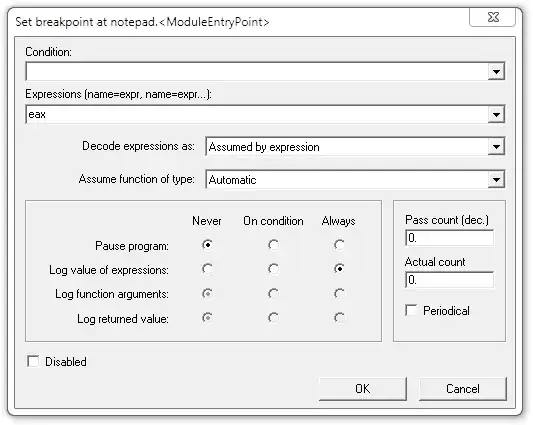
Press the OK button, run your program, and now the referenced string will get logged to OllyDbg's log window whenever that instruction is hit.

Jason Geffner
- 20,681
- 1
- 36
- 75
-
With regard to blabb's answer below, yes, my answer above was for OllyDbg 2. – Jason Geffner Feb 07 '14 at 20:27
-
Is there a to way log in case of some memory DWORD has changed? – ST3 Feb 18 '15 at 08:47
0
in odbg version 1.10
that will only log eax not the string
in the expression box put either STRING [EAX] or UNICODE [eax] as the case may be
or with plain eax select pointer to ascii or unicode string in decode expression as dropdown box to log strings
Log data, item 0 Message=eax = 1001590 [eax] = 74636868 string [eax] = hhctrl.ocx unicode [eax] =
odbg 210 will decode expression automatically
01012475  INT3: plain eax = 1001590 ASCII "hhctrl.ocx"
                dword ptr eax = 74636868 (1952671848.)
                ascii string ptr eax = hhctrl.ocx

blabb
- 16,376
- 1
- 15
- 30