7

I've created a recurring task in MS project and I'd like to assign resources (staff) to that resource but when I add the resource(s) to the task the Work hours multiply to extremes and I don't understand why..

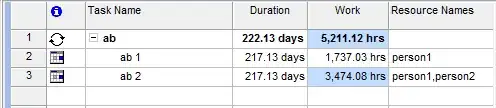
For example I have Project Meeting as a recurring task, it's duration is 217.13 days and the Work is set to 22 hours. However, when I assign a resource this jumps to 1759 hours. If I add another resource this jumps to 3496 hours.

What's going on?

Edit: It only seems to happen when I add to "resource names" rather than "assigning" resources. So.. what's the difference?

Sheldon
  • 211
  • 2
  • 4

2 Answers2

5

More than probably your task is set by default as "Fixed Units" so the initial 22 hours of work are not kept fixed.

Now 217.13 days * 8 hours/day = 1737 hours (the task duration in hours)

Whenever you add a new resource in "Resource names" column MS Project tries to guess what you want to do. And by default he believes you are adding a new resource with 100% allocation so it results:

22 + 1737 (hours the new resource will have to work) = 1759 hours

Adding a new resource results in:

1759 + 1737 = 3496 hours

When you assign all resources at once using the "Task information" dialog, all resources are assigned with 1% allocation.

I suggest you first add resources and then set the desired work. Otherwise MS Project might thing you are trying to do some resource leveling.

tiberiug
  • 191
  • 1
  • 4
3

I think it's because of the nature of recurring task itself. Since each resources are assigned to a recurring task, the working hours tend to exceed in each task.

Example of recurring task

I assigned resources to task. The output is shown above.

deepz
  • 453
  • 3
  • 9