This is an interesting question. Here is a non-direct path (assuming you are using Windows).
TL;DR print hard copies with check font, scan/photograph them, use OCR.
I used Python to write the few MICR characters in Unicode. I use the utf-16-le (little endian) encoding with BOM.
import codecs
with open('micr.txt','wb') as output:
    output.write(codecs.BOM_UTF16)
    for ichar in xrange(9280,9280+11):
        line = ( u'1'+unichr(ichar)+u'\n').encode('utf-16')
        output.write(line)
    output.write( (u'0123456789'+u'\n').encode('utf-16') )
The output looks like this (I suggest using Notepad++ or another high-level text editor). It's required to have some character before each of the non-numeric MICR unicode characters, I just chose '1' for simplicity:
1⑀
1⑁
1⑂
1⑃
1⑄
1⑅
1⑆
1⑇
1⑈
1⑉
1⑊
0123456789
These are all the possible unicode characters for MICR. Of course, the font is wrong. (A simpler method would be to copy paste from here)
The MICR font costs money, unfortunately, but there is an open version: GnuMICR. You can download the font directly here: GnuMICR.ttf. To install, just double click and then restart and running programs where you want to use it.
I then took my output text from above, and pasted it into LibreOffice Writer (other MS Word-like programs will work, too). Highlight all the text and change the font to GnuMICR. I've shared the LibreOffice Writer .ODT file here (you must have the GnuMICR font already installed).
The screenshot below shows what my screen looks like.
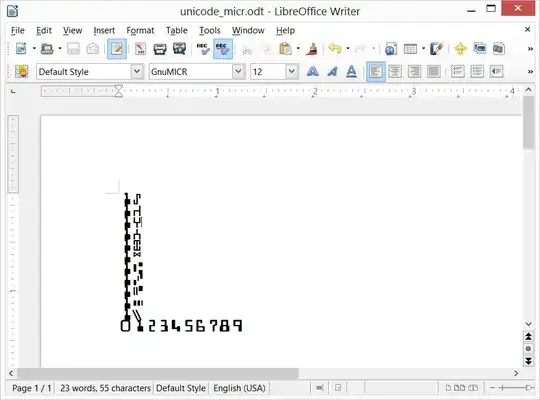
From here, you can use the Python code or lots of copy/paste to generate unlimited routing and account numbers. Let me know if you want a python snippet to generate fake routing/account numbers.
To really test the OCR, generate your own MICR documents by physically printing your digital "checks" and then scan/photograph (re-digitize) them. Between printing and scanning you can have some fun by folding, spilling coffee, etc.
You can also digitally damage the images, for example, by using Python Imagine Library (PIL) and methods such as discussed here.


