16

As it stands all of my lectures are presented by me writing on pre-printed acetate sheets (printed with my notes with gaps for pictures, examples, etc.) which are then projected onto a screen using the acetate projector.

While I am happy enough with this I am not very happy with the amount of acetate sheets that I am using... perhaps of the order of 1000 per year which must cost in the hundreds rather than the tens.

The obvious solution would be to reuse the sheets but there are a number of problems with this. Firstly cleaning the ink off is messy and cannot be done after about a month. Secondly, and far more importantly, I like to edit and update my notes from year to year so I need new acetate sheets every year.

Therefore I have been thinking of employing a new system where I have a screen displaying the same notes (in pdf), that I can write on with a 'stylus' pen such that the file and the writing is projected from the overhead onto the white screen.

The first advantage to this would be that there would be no more need for acetates and the second would be that I could save the files including the original content as well as the scribblings.

I recall my PhD supervisor employing such a system and I emailed him

"What was that device you had where you could write directly onto a screen and then have it projected (and presumably save the file with the writing).

I am going through a small acetate rainforest every semester and it is starting to prick my conscience."

He replied with " I use a tablet PC, i.e. a laptop running some version of Windows with touch sensitive screen, and use the programme Windows Journal. There are plenty of other versions of such programmes now I believe, but I've been using the same set-up for 7 years or so(!), so haven't kept pace with the changes... Having said that, [a colleague] recently bought an iPad and a stylus for this which seems to let him do much the same thing, and this would be a cheaper option than a tablet PC; I imagine other tablets of the iPad variety, i.e. Android devices etc., probably can be equipped with styli. What you probably need to work out is how you aim to connect your device to whatever projection facilities you have available."

I assume that the projection facilities that I have are adequate. Can anybody make a recommendation or have any other advice or feedback? I suspect that I need a more accurate stylus than my PhD supervisor uses/used.

POST ANDREW STACEY COMMENT EDIT: Thank you very much for the great advice Andrew however having looked at your slides I don't think the IPad is going to do the trick. To show what I need my solution to do I have attached the following slides from my notes (sorry that they are sideways!). I think my 'screen' that I write on will have to be A4.
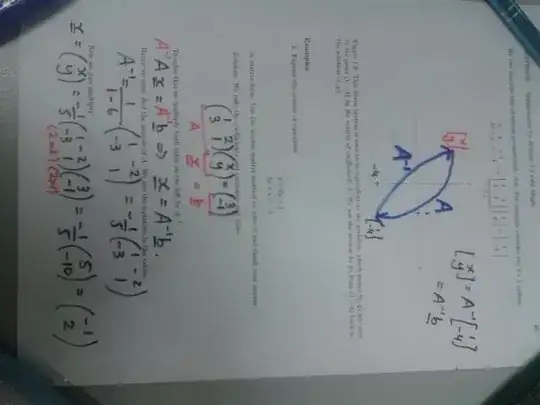
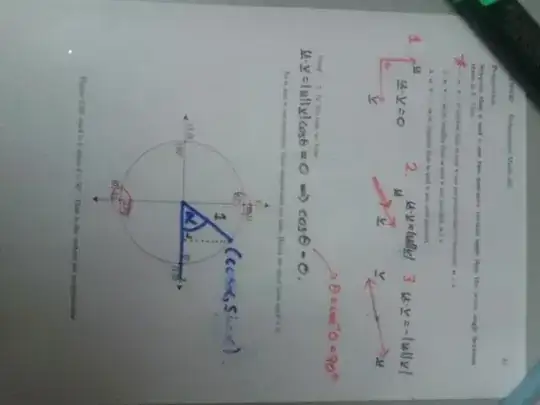
enter image description here

enter image description here

enter image description here

SECOND EDIT: What do folks know about a system using "a graphics tablet and a laptop"?

THIRD EDIT: I now use, both on- and offline, paper together with an Epsom document camera.

JP McCarthy
  • 756
  • 5
  • 15
  • 4
    See my answer here: http://math.stackexchange.com/a/204525/2907 and the links therein. – Andrew Stacey May 27 '14 at 12:11
  • Thanks a million Andrew. – JP McCarthy May 27 '14 at 12:24
  • 2
    It's only been 9 years since I last taught, but this question makes it seem like 90 years. I always used blackboards, with the occasional use of an overhead projector to show a calculator display or to show a MAPLE generated graph (prepared in advance). – Dave L Renfro May 27 '14 at 19:50
  • @DaveLRenfro If it is any good to you I DESPISE whiteboards and much prefer blackboards to them. – JP McCarthy May 27 '14 at 20:45
  • I never had a choice between whiteboards and blackboards -- every place I've taught at only had blackboards, at least in the rooms I was assigned to teach. I have used whiteboards for conference talks however. – Dave L Renfro May 27 '14 at 21:33
  • @AndrewStacey Thank you very much for the great advice Andrew however having looked at your slides I don't think the IPad is going to do the trick. – JP McCarthy May 28 '14 at 10:21
  • @JpMcCarthy I'm curious as to what aspect of my slides led you to that conclusion. My way is only one way of doing this and is a bit of a peculiar one at that so might not be the best to look at to get an all-round view of what's possible. – Andrew Stacey May 28 '14 at 10:59
  • @JpMcCarthy Ah, I didn't see your edit. I don't see why that wouldn't be possible on an iPad. – Andrew Stacey May 28 '14 at 11:00
  • @AndrewStacey I have been writing on A4 and I think my 'screen' needs to be A4 also. – JP McCarthy May 28 '14 at 11:11
  • @JpMcCarthy That's the beauty of electric devices! You have a "zoom" facility. You can zoom in on the part where you're writing and write large and clear there. But the students don't see the extra fuss and just see the text appear as you write it. So long as the projected page looks okay as A4 (and that might not be so - projectors generally are sized for landscape), the iPad can accommodate your writing needs. – Andrew Stacey May 28 '14 at 11:36
  • @AndrewStacey Now you are talking. Any advice on a stylus? I need it to be relatively fine. – JP McCarthy May 28 '14 at 12:16
  • @JpMcCarthy Aye, there's the rub. Most tablet devices are designed to take their input from a finger, and the stylus has to simulate the effect of a finger in order to be noticed. I've yet to find a "great" stylus, but I've found that a normal stylus is "okay", especially with the zoom. But you'll never get the same precision as you would with, say, a graphics tablet and a laptop. Just that a tablet is a whole lot easier to lug around. – Andrew Stacey May 28 '14 at 15:54
  • "...a graphics tablet and a laptop"... what if I have no problem lugging stuff around? Something like this: http://www.aiptek.com.tw/c0_1.php?pid=17 ? – JP McCarthy May 29 '14 at 07:56
  • 1
    For what it worth, Android is not a variety of iPad. I am using a Samsung Galaxy Note which is great to take notes (written annotations on pdf, notes during a conference,...). I don't use it in class though (next semester maybe?) but students use it to make comments on their electronic version of the textbook.

    When it was released, Samsung Note was a success due to the precision of its stylet (at that time, most stylet were made to substitute your finger and avoid finger prints, not hand writing). It is version 3 now I think, so you may find alternatives (cheaper, different OS,...).

    – Taladris Jun 02 '14 at 07:22
  • @JpMcCarthy (Sorry, I didn't get notified of your comment.) Yes, if you have the backpack space, use a laptop and graphics tablet (I have a wacom bamboo, drawing area A6). That's what I used in my pre-iPad days and it's more accurate to write on. I had a mildly hacked version of xournal on the laptop (I've also used jarnal). I changed to the iPad because I was lugging around a 17" laptop as it was the only laptop I had that would connect in all the lecture theatres (my smaller one had issues). – Andrew Stacey Jun 04 '14 at 06:57
  • @AndrewStacey The Civil Eng department have showed me (I think is was called) a Wacom table that they use for an online delivery. I am going to try it out over the next while. I will have to use Powerpoint and 'lug' the laptop around with me but these aren't massive issues. – JP McCarthy Jun 04 '14 at 10:58

1 Answers1

1

A "convertible tablet" notebook computer might fit with what you're looking for—I've used an older version of this ThinkPad from Lenovo to teach (I had been using an overhead and transparencies and switched to a convertible tablet and projector, using Windows Journal) and to give presentations/workshops. Basically, the idea would be to get a computer that runs a full version of Windows and has a built-in pen digitizer (more accurate than the stylus add-ons for touch-based screens). I think there might be a Microsoft Surface Pro that has pen input as well, but I haven't kept up with the technology as much over the past few years.

Isaac
  • 161
  • 1
  • 6
  • Or you could upgrade Windows to Linux ... Seriously, the OS is not important here. Also, the ability to write directly on the screen is not as important as it might seem. I successfully used a graphics tablet and found that I quickly got used to the fact that I was writing somewhere other than where the text was appearing. – Andrew Stacey Jun 04 '14 at 06:58
  • Perhaps cost might be an issue for me here with this option. – JP McCarthy Jun 04 '14 at 11:01
  • @AndrewStacey: The OS is actually kind of important—the pen-tablet tools provided with Windows are (or at least were) better than those available on Mac or Linux. I have and have used both convertible tablets and separate graphics tablets and have found that writing on the screen is a lot easier than not. – Isaac Jun 04 '14 at 15:51
  • @JpMcCarthy: Yep, new convertible tablets are not cheap... it may be possible to find a used (business off-lease refurbished) ThinkPad convertible tablet on eBay for considerably less money—I think I paid around $300-400 for my last one. – Isaac Jun 04 '14 at 15:52
  • @Isaac Is your experience from using them when lecturing, or general use? – Andrew Stacey Jun 04 '14 at 16:11
  • @AndrewStacey: From using them for teaching. – Isaac Jun 04 '14 at 16:13
  • @Isaac Sorry to pin you down on this, but teaching or lecturing? – Andrew Stacey Jun 04 '14 at 16:19
  • @AndrewStacey: Teaching secondary school mathematics, which entailed limited direct-lecturing, but was generally more interactive than would be considered "lecturing," and giving presentations (closer to direct lecturing) and workshops (more like interactive teaching). – Isaac Jun 04 '14 at 18:00
  • @Isaac That's useful for comparing experiences. I find that when lecturing, accuracy isn't all that important. But I can imagine that in a school context, it would be more crucial because you're seeing the writing more close up. – Andrew Stacey Jun 04 '14 at 20:30