The solution above is not fully correct. You are adding a field as a "naked" html element and a product form is an UI form with its own peculiarities. A special class (vendor/magento/module-ui/view/base/web/js/form/form.js) is responsible for fields collection and their validation when a form is sent. Also, this class should miss the fields that are not related to this UI form or not an additional fields like all your fields. You should use the following naming in order to make sure that your field will be send to the controller:
input type="text" name="product[my_new_field]" value="123"
But this is not completely correct because the correct solution is not to deviate from the UI form usage standards and utilize its native elements and components. In this case you shouldn't be worry about such a thing because everything will be processed automatically.
You can check the main method of storing the UI forms data in order to understand the process:
/**
 * Submits form
 *
 * @param {String} redirect
 */
submit: function (redirect) {
    var additional = collectData(this.additionalFields),
        source = this.source;

    _.each(additional, function (value, name) {
        source.set('data.' + name, value);
    });

    source.save({
        redirect: redirect,
        ajaxSave: this.ajaxSave,
        ajaxSaveType: this.ajaxSaveType,
        response: {
            data: this.responseData,
            status: this.responseStatus
        },
        attributes: {
            id: this.namespace
        }
    });
},
As you can see from this code, an html form with all its fields is not send. However, this.source and this.additionalFields are send but your element is not included in it because it is declared incorrectly.
UPDATE FROM 08.23.2016
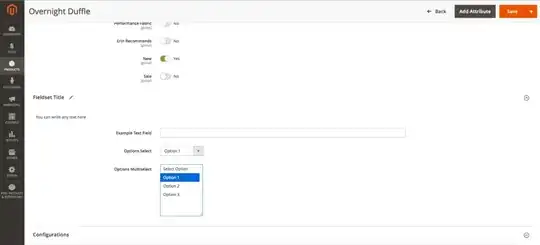
Here is the example on how to add a fieldset from our blog. You can read the full article, using the link below:
Source: An easy way to add a fieldset with fields to the UI-form :
Add the content: the UI-form meta-data and virtual type for its
addition.
Create a file app/code/Vendor/Product/etc/adminhtml/di.xml. We are
going to place a modifier inside:
<?xml version="1.0"?>
<config xmlns:xsi="http://www.w3.org/2001/XMLSchema-instance" xsi:noNamespaceSchemaLocation="urn:magento:framework:ObjectManager/etc/config.xsd">
    <virtualType name="Magento\Catalog\Ui\DataProvider\Product\Form\Modifier\Pool">
        <arguments>
            <argument name="modifiers" xsi:type="array">
                <item name="custom-fieldset" xsi:type="array">
                    <item name="class" xsi:type="string">Vendor\Product\Ui\DataProvider\Product\Form\Modifier\CustomFieldset</item>
                    <item name="sortOrder" xsi:type="number">10</item>
                </item>
            </argument>
        </arguments>
    </virtualType>
</config>
Now, create the modifier file
(app/code/Vendor/Product/Ui/DataProvider/Product/Form/Modifier/CustomFieldset.php)
with a custom fieldset for the product editing page and fill it with
the fields:
<?php
namespace Vendor\Product\Ui\DataProvider\Product\Form\Modifier;

use Magento\Catalog\Model\Locator\LocatorInterface;
use Magento\Catalog\Ui\DataProvider\Product\Form\Modifier\AbstractModifier;
use Magento\Framework\Stdlib\ArrayManager;
use Magento\Framework\UrlInterface;
use Magento\Ui\Component\Container;
use Magento\Ui\Component\Form\Fieldset;
use Magento\Ui\Component\Form\Element\DataType\Number;
use Magento\Ui\Component\Form\Element\DataType\Text;
use Magento\Ui\Component\Form\Element\Input;
use Magento\Ui\Component\Form\Element\Select;
use Magento\Ui\Component\Form\Element\MultiSelect;
use Magento\Ui\Component\Form\Field;

class CustomFieldset extends AbstractModifier
{

    // Components indexes
    const CUSTOM_FIELDSET_INDEX = 'custom_fieldset';
    const CUSTOM_FIELDSET_CONTENT = 'custom_fieldset_content';
    const CONTAINER_HEADER_NAME = 'custom_fieldset_content_header';

    // Fields names
    const FIELD_NAME_TEXT = 'example_text_field';
    const FIELD_NAME_SELECT = 'example_select_field';
    const FIELD_NAME_MULTISELECT = 'example_multiselect_field';

    /**
     * @var \Magento\Catalog\Model\Locator\LocatorInterface
     */
    protected $locator;

    /**
     * @var ArrayManager
     */
    protected $arrayManager;

    /**
     * @var UrlInterface
     */
    protected $urlBuilder;

    /**
     * @var array
     */
    protected $meta = [];

    /**
     * @param LocatorInterface $locator
     * @param ArrayManager $arrayManager
     * @param UrlInterface $urlBuilder
     */
    public function __construct(
        LocatorInterface $locator,
        ArrayManager $arrayManager,
        UrlInterface $urlBuilder
    ) {
        $this->locator = $locator;
        $this->arrayManager = $arrayManager;
        $this->urlBuilder = $urlBuilder;
    }

    /**
     * Data modifier, does nothing in our example.
     *
     * @param array $data
     * @return array
     */
    public function modifyData(array $data)
    {
        return $data;
    }

    /**
     * Meta-data modifier: adds ours fieldset
     *
     * @param array $meta
     * @return array
     */
    public function modifyMeta(array $meta)
    {
        $this->meta = $meta;
        $this->addCustomFieldset();

        return $this->meta;
    }

    /**
     * Merge existing meta-data with our meta-data (do not overwrite it!)
     *
     * @return void
     */
    protected function addCustomFieldset()
    {
        $this->meta = array_merge_recursive(
            $this->meta,
            [
                static::CUSTOM_FIELDSET_INDEX => $this->getFieldsetConfig(),
            ]
        );
    }

    /**
     * Declare ours fieldset config
     *
     * @return array
     */
    protected function getFieldsetConfig()
    {
        return [
            'arguments' => [
                'data' => [
                    'config' => [
                        'label' => __('Fieldset Title'),
                        'componentType' => Fieldset::NAME,
                        'dataScope' => static::DATA_SCOPE_PRODUCT, // save data in the product data
                        'provider' => static::DATA_SCOPE_PRODUCT . '_data_source',
                        'ns' => static::FORM_NAME,
                        'collapsible' => true,
                        'sortOrder' => 10,
                        'opened' => true,
                    ],
                ],
            ],
            'children' => [
                static::CONTAINER_HEADER_NAME => $this->getHeaderContainerConfig(10),
                static::FIELD_NAME_TEXT => $this->getTextFieldConfig(20),
                static::FIELD_NAME_SELECT => $this->getSelectFieldConfig(30),
                static::FIELD_NAME_MULTISELECT => $this->getMultiSelectFieldConfig(40),
            ],
        ];
    }

    /**
     * Get config for header container
     *
     * @param int $sortOrder
     * @return array
     */
    protected function getHeaderContainerConfig($sortOrder)
    {
        return [
            'arguments' => [
                'data' => [
                    'config' => [
                        'label' => null,
                        'formElement' => Container::NAME,
                        'componentType' => Container::NAME,
                        'template' => 'ui/form/components/complex',
                        'sortOrder' => $sortOrder,
                        'content' => __('You can write any text here'),
                    ],
                ],
            ],
            'children' => [],
        ];
    }

    /**
     * Example text field config
     *
     * @param $sortOrder
     * @return array
     */
    protected function getTextFieldConfig($sortOrder)
    {
        return [
            'arguments' => [
                'data' => [
                    'config' => [
                        'label' => __('Example Text Field'),
                        'formElement' => Field::NAME,
                        'componentType' => Input::NAME,
                        'dataScope' => static::FIELD_NAME_TEXT,
                        'dataType' => Number::NAME,
                        'sortOrder' => $sortOrder,
                    ],
                ],
            ],
        ];
    }

    /**
     * Example select field config
     *
     * @param $sortOrder
     * @return array
     */
    protected function getSelectFieldConfig($sortOrder)
    {
        return [
            'arguments' => [
                'data' => [
                    'config' => [
                        'label' => __('Options Select'),
                        'componentType' => Field::NAME,
                        'formElement' => Select::NAME,
                        'dataScope' => static::FIELD_NAME_SELECT,
                        'dataType' => Text::NAME,
                        'sortOrder' => $sortOrder,
                        'options' => $this->_getOptions(),
                        'visible' => true,
                        'disabled' => false,
                    ],
                ],
            ],
        ];
    }

    /**
     * Example multi-select field config
     *
     * @param $sortOrder
     * @return array
     */
    protected function getMultiSelectFieldConfig($sortOrder)
    {
        return [
            'arguments' => [
                'data' => [
                    'config' => [
                        'label' => __('Options Multiselect'),
                        'componentType' => Field::NAME,
                        'formElement' => MultiSelect::NAME,
                        'dataScope' => static::FIELD_NAME_MULTISELECT,
                        'dataType' => Text::NAME,
                        'sortOrder' => $sortOrder,
                        'options' => $this->_getOptions(),
                        'visible' => true,
                        'disabled' => false,
                    ],
                ],
            ],
        ];
    }

    /**
     * Get example options as an option array:
     *      [
     *          label => string,
     *          value => option_id
     *      ]
     *
     * @return array
     */
    protected function _getOptions()
    {
        $options = [
            1 => [
                'label' => __('Option 1'),
                'value' => 1
            ],
            2 => [
                'label' => __('Option 2'),
                'value' => 2
            ],
            3 => [
                'label' => __('Option 3'),
                'value' => 3
            ],
        ];

        return $options;
    }
}
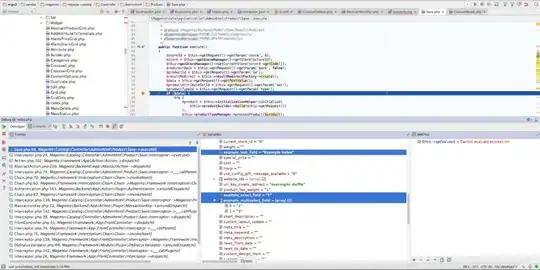
The data saving takes place inside the product controller file
vendor/magento/module-catalog/Controller/Adminhtml/Product/Save.php
in the main execute method. If everything has been done in the right
way, then our data will be displayed correctly in the input data of
this method:
Note, if your product doesn’t have those attributes from the
beginning, you should save them manually. You can do this in the
observer.
First, declare it in the
app/code/Vendor/Product/etc/adminhtml/events.xml file (we are using
the adminhtml scope because the form doesn’t exist on the front-end):
<?xml version="1.0"?>
<config xmlns:xsi="http://www.w3.org/2001/XMLSchema-instance" xsi:noNamespaceSchemaLocation="urn:magento:framework:Event/etc/events.xsd">
    <event name="catalog_product_save_after">
        <observer name="save_example_data" instance="Vendor\Product\Observer\ProductSaveAfter" />
    </event>
</config>
Then, create the observer’s class that we pointed in the instance
attribute – app/code/Vendor/Product/Observer/ProductSaveAfter.php:
<?php
namespace Vendor\Product\Observer;

use \Magento\Framework\Event\ObserverInterface;
use \Magento\Framework\Event\Observer as EventObserver;
use Vendor\Product\Ui\DataProvider\Product\Form\Modifier\CustomFieldset;

class ProductSaveAfter implements ObserverInterface
{

    /**
     * @param EventObserver $observer
     */
    public function execute(\Magento\Framework\Event\Observer $observer)
    {
        /** @var \Magento\Catalog\Model\Product $product */
        $product = $observer->getEvent()->getProduct();
        if (!$product) {
            return;
        }

        $exampleTextField = $product->getData(CustomFieldset::FIELD_NAME_TEXT);
        $exampleSelectField = $product->getData(CustomFieldset::FIELD_NAME_SELECT);
        $exampleMultiSelectField = $product->getData(CustomFieldset::FIELD_NAME_MULTISELECT);

        // Manipulate data here
    }
}
The data in the observer:

Now, you can call your own model from the observer and save data in it
or modify it as you wish.
Be careful! If the saving of your model is connected with the product saving, then it can lead to the recurssion.


