10

I have a list of X,Y coordinates from a csv file, that represent a polygon. I´m trying to create a Polygon-Shapefile from this list. I´ve been trying around and found a possbility to write the list to a Point-Shapefile.

Unfortunately that is not enough for me. Is there any way to get the coordinates in a Polygon-shapefile straight away?

Following Brad´s suggestions I tried the following code:

for i in list:
    w = shapefile.Writer(shapefile.POLYGON)
    w.poly(parts=[list])
    w.field('F_FLD','C','40')
    w.field('S_FLD','C','40')
    w.record('First','Polygon')
    w.save('C:/Users/.../Desktop/Shape')

Unfortunately I´m getting an error message:

ShapefileException: Failed to write shapefile bounding box. Floats required.

Looks like there is a problem saving the shapefile to disk. This seems to be a similar question, but I couldn´t work out, how to get it going in my case.

Martin
  • 1,273
  • 1
  • 12
  • 23

4 Answers4

8

From the pyshp documentation page:

>>> # Create a polygon shapefile
>>> w = shapefile.Writer(shapefile.POLYGON)
>>> w.poly(parts=[[[1,5],[5,5],[5,1],[3,3],[1,1]]])
>>> w.field('FIRST_FLD','C','40')
>>> w.field('SECOND_FLD','C','40')
>>> w.record('First','Polygon')
>>> w.save('shapefiles/test/polygon')

Just substitute your list for the parts= argument to Writer.poly, and set whatever fields you would like to associate with your shapefile.

BradHards
  • 12,881
  • 2
  • 37
  • 70
  • Thanks for your suggestion. Unfortunately I can´t get it working like that. I get the error message: ShapefileException: Failed to write shapefile bounding box. Floats required. I updated my question accordingly – Martin Feb 05 '14 at 11:53
7

This expands on the answer posted by BradHards:

The error message sounds like is expecting floats where it is not getting them. If your coordinate list is a set of ints, try casting them to floats:

shape = [[1,5], [5,5], [5,1], [3,3], [1,1]]
shape = [[float(coord) for coord in pair] for pair in shape]
4

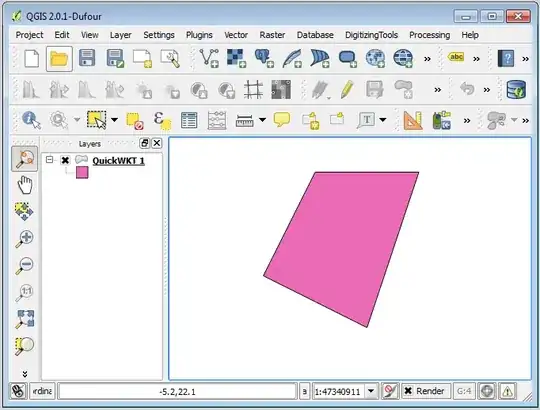
One easy (one time) solution is to use the QuickWKT Plugin.

Transform your list into a EWKT string by adding a the header with the SRID and the type of geometry. Add a comma in the end of each XY pair.

SRID=4326;POLYGON
((
 30 10,
 10 20,
 20 40,
 40 40,
 30 10
))

Copy + paste the all thing to QuickWKT Plugin's dialog, and press OK.

enter image description here

Your polygon will be created in a memory layer in QGIS. After that, you can do whatever you want with it, including Save as... (Shapefile).

enter image description here

Alexandre Neto
  • 14,212
  • 2
  • 58
  • 85
3

I just put together this piece of code to do this task. It uses a tab-delineated .ascii file as the input and creates a simple .shp file in an unspecified Lat Long projection. Hopefully it can help someone else trying to do this.

# ------------------------------------------------------
# IMPORTS
# ------------------------------------------------------

import os import pandas as pd from shapely.geometry import Polygon, mapping from fiona import collection

------------------------------------------------------

INPUTS

------------------------------------------------------

Define path

path = os.path.abspath(os.path.dirname(file))

Set working directory

os.chdir(path)

Define file to convert

file = 'points.ascii'

Define shp file schema

schema = { 'geometry': 'Polygon', 'properties': { 'Name': 'str' } }

Read in data

data = pd.read_csv(file, sep='\t')

Define shp file to write to

shpOut = 'poly.shp'

Create array for storing vertices

polyPoints = []

Create shp file

with collection(shpOut, "w", "ESRI Shapefile", schema) as output: # Loop through dataframe and populate shp file for index, row in data.iterrows():

    # Add points to polyPoints
    polyPoints.append([row['Longitude'], row['Latitude']])

    # Define polygon
polygon = Polygon(polyPoints)

# Write output
output.write({
    'properties': {'Name': 'Polygon_from_points' }, 
    'geometry': mapping(polygon)
})

Casivio
  • 339
  • 1
  • 2
  • 10