What are the commands to apply all types of zoom (full, on selected layer, etc.) in python console? I'm searching both on pyqgis cookbook and API documentantion, but I'm not finding anything interesting.
Asked
Active
Viewed 6,710 times
12


-
Not sure please check out http://www.qgis.org/pyqgis-cookbook/canvas.html#embedding-map-canvas & QGIS API doc (http://www.qgis.org/api/index.html) – Sunil Mar 06 '13 at 12:11
-
- useful for you http://gis.stackexchange.com/questions/3651/where-can-i-find-qgis-tutorials-and-resources
– Sunil Mar 06 '13 at 12:24
2 Answers
19
After getting around cookbook, the best place to learn is referring the QGis API Documentation. In this case we are looking for zoom functions, which are related to map canvas. So check if QgsMapCanvas class contains something.
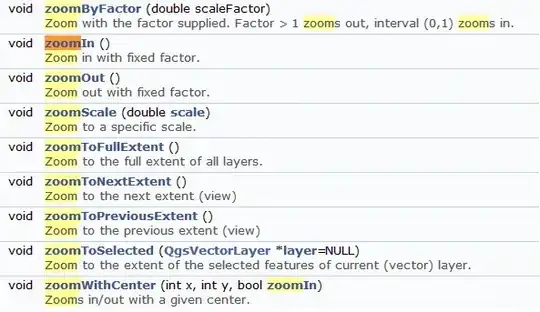
Zoom functions available in QGis are provided in QgsMapCanvas Class.
>>> canvas = qgis.utils.iface.mapCanvas()
>>> canvas.zoomIn()
>>> canvas.zoomOut()
>>> canvas.zoomToFullExtent()

vinayan
- 7,282
- 3
- 37
- 75
-
How to you get to
qgis.utils.iface.mapCanvas()fromQgsMapCanvas? I tried to toa = QgsMapCanvas()and thena.zoomIn()but it doesnt do anything. Thanks – user1655130 May 07 '21 at 09:03 -
6
All the zoom options under the 'View' menu can be executed in the python console by the following code.
eMenu = self.iface.viewMenu()
eMenu.actions() [index].trigger()
Replace the "index" with the index number of the zoom action you want to perform. For eg., To perform 'zoom to selected features', use
eMenu.actions() [12].trigger()

Sjs
- 997
- 1
- 11
- 23
-
2How do you know that the number 12 denotes 'zoom to selected features'? – Anthony Stokes Jan 11 '17 at 03:28
-