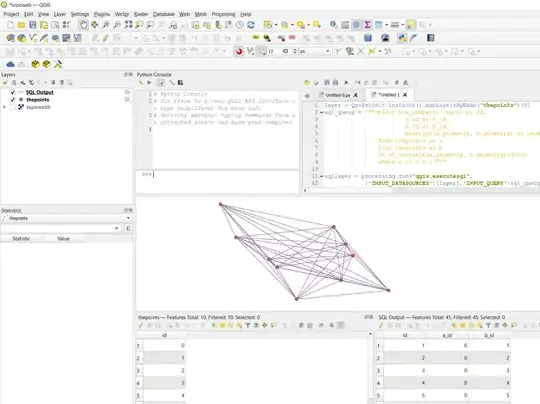
You dont need to use geometry by expression if you are going to use PyQGIS anyway.
With itertools.combinations you can generate all pairwise point combinations, then build linestrings between them:
from itertools import combinations
point_layer = QgsProject.instance().mapLayersByName("Vertices")[0]
#Create a line layer
vl = QgsVectorLayer(f"LineString?crs={point_layer.crs().authid()}", "linelayer", "memory")
provider = vl.dataProvider()
#For each unique combination of two point features
for combo in combinations(point_layer.getFeatures(), 2):
    new_feature = QgsFeature() #Create a new feature
    #Create its line geometry
    new_geometry = QgsGeometry.fromPolyline(QgsLineString([f.geometry().asPoint() for f in combo]))
    new_feature.setGeometry(new_geometry)
    provider.addFeature(new_feature) #Add the feature to the line layer
QgsProject.instance().addMapLayer(vl)

Another option is to create the lines using SQL. This query joins the point layer to itself on distance shorter than 30000 (adjust) and where the id is not the same, and creates a line between each join pair. You need a unique id column, mine is named id
select row_number() over() as id, a.id as a_id, b.id as b_id, makeline(a.geometry, b.geometry) as geometry
from thepoints as a
join thepoints as b
on st_distance(a.geometry, b.geometry)<30000
where a.id < b.id
Which you can execute using Execute SQL:
layer = QgsProject.instance().mapLayersByName("thepoints")[0]
sql_query = """select row_number() over() as id,
                        a.id as a_id,
                        b.id as b_id,
                        makeline(a.geometry, b.geometry) as geometry
                from thepoints as a
                join thepoints as b
                on st_distance(a.geometry, b.geometry)<30000
                where a.id < b.id"""
sqllayer = processing.run("qgis:executesql",
            {'INPUT_DATASOURCES':[layer],'INPUT_QUERY':sql_query,'INPUT_UID_FIELD':'',
            'INPUT_GEOMETRY_FIELD':'','INPUT_GEOMETRY_TYPE':None,'INPUT_GEOMETRY_CRS':None,
            'OUTPUT':'TEMPORARY_OUTPUT'})["OUTPUT"]
QgsProject.instance().addMapLayer(sqllayer)