2

I would like to get only one feature from a MySQL database.

I use the Add Vector Layer functionality in QGIS to get the features (polygons) from the MySQL database. They are all displaying fine, but my problem is that I would like to get only one feature/polygon from the database, filtering by a MySQL query by example (it would be perfect).

Is there a way to do so ?

PolyGeo
  • 65,136
  • 29
  • 109
  • 338
Julien Fouilhé
  • 323
  • 1
  • 2
  • 14

2 Answers2

3

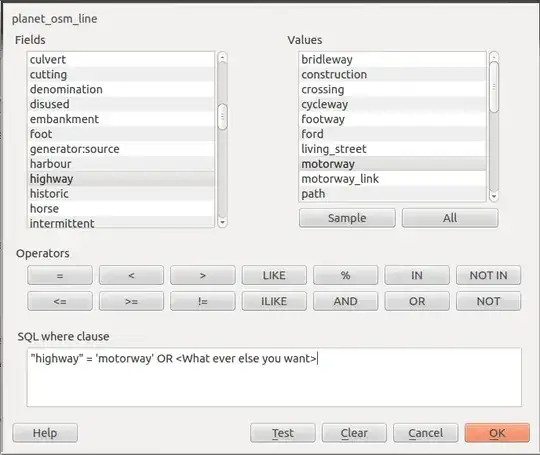
When you connect to your database and after you selected the table your wish to view, there is a button which says "Build Query". And then you tell qgis which features you want to fetch.

connect-window query-window

If for some reason you cannot access the build-in query builder you can create a View.

Go in the database and enter,

CREATE OR REPLACE VIEW myView AS SELECT * FROM <SPATIAL_TABLE> where <constraints>;

And then point QGIS at the created view. Also check How to create a table from existing tables (applying new schemas) in postgis DB? for more details.

PolyGeo
  • 65,136
  • 29
  • 109
  • 338
nickves
  • 11,519
  • 3
  • 42
  • 75
2

I found a solution using the ogr2ogr executable, which supports MySQL (if you're using PostgreSQL, see pgsql2shp and shp2pgsql). I'm using it like this and it works fine.

ogr2ogr -overwrite -where "YOUR SQL CONDITION" -f "ESRI Shapefile" SHPCREATED.shp MYSQL:vine,host=localhost,user=root YOURTABLE

If you're under Mac OS X, the executable has been installed in /Library/Frameworks/GDAL.framework/Versions/1.9/Programs/

I was looking for a solution which was possible in command-line, because I'm working on a website and I would like to do these tasks automatically. Therefore, this is perfect for me.

PolyGeo
  • 65,136
  • 29
  • 109
  • 338
Julien Fouilhé
  • 323
  • 1
  • 2
  • 14