Here are two methods for attributing maps. One is quick and easy; the other is less convenient but better practice.
Method One (Quick and Dirty): Use Basemaps "With Attribution"
This is the method you're currently using. I often use this method, as it's quick and easy. You basically just add the name of the basemap layer to the final map.
Layers obtained through the QuickMapServices plugin come with Attribution metadata, but it doesn't look like OpenLayers basemaps have any Attribution metadata. Here's what the Attribution metadata looks like for the "Google Hybrid" layer obtained through the QuickMapServices plugin:
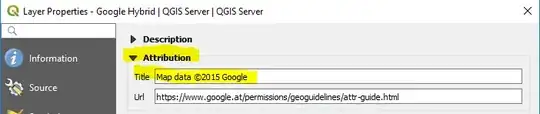
So a quick and easy way to attribute this basemap is with this attribution text: "Basemap: Google Hybrid, Map data ©2015 Google"
or "Basemap: Google Hybrid (obtained through QuickMapServices QGIS plugin), Map data ©2015 Google"
The problem with this method, is that each basemap provider has their own terms of service and copyright restriction. If you don't read the terms of service for that data provider, you might be unknowingly violating them. For example, some providers may allow you to use their basemaps, with attribution, for any purpose. Another provider may allow you to use them for non-commercial purposes only. A third provider might allow you to use them for non-commercial purposes for free, and for commercial purposes only if you pay a fee. To make sure you're not violating copyright, you should follow Method Two (below).
Pro: Quick and easy.
Con: You might be violating copyrights.
Method Two (Best Practice): Follow the Terms of Service for the Specific Data Provider
Each basemap provider (Google, OSM/Stamen, Bing, Apple Maps, Wikimedia Maps, etc) has their own terms of service. The best/safest method is to read the current terms of service for the data provider of the basemap you're using. Notice in the image above that underneath the map Title, is a web address for Google's attribution guide. If you go to this page, you'll find rules about what Google does and doesn't allow you to do with their basemaps.
Most basemaps from the QuickMapServices plugin have this link included in their metadata. OpenLayers doesn't provide this link, so you'll have to locate it yourself on the website for the data provider.
Pro: You know you're not violating copyrights.
Con: Takes longer.
My recommendation:
Assign each of your students to research the copyright requirements of one basemap provider. Have them write a short summary of those requirements. Provide all the summaries to the class. Then require your students to follow the copyright requirements when they produce their maps.
You might be tempted to ignore copyrights and terms of service, because it's "only a school assignment," so you figure you'll probably get away with it. But I think you would do a disservice to your students if you did this. Instead, take this opportunity to teach your students to do it right.


