38

I know I can add KML files once I have unzipped the KMZ files, but is there a way to open KMZ files directly?

When I try to open a kmz file on QGIS 1.8.0 on Windows XP, through the all files filter, it does not accept it as a valid format.

Am I doing something wrong?

Does this all depend on OGR support?

PolyGeo
  • 65,136
  • 29
  • 109
  • 338
afwatl
  • 573
  • 1
  • 5
  • 10

9 Answers9

20

On a Mac, where QGIS uses the Kyngchaos.com GDAL 1.9 Complete framework, or on any platform where QGIS has been compiled against a GDAL build with support for the Google LIBKML driver, you can open .kmz files directly using the open dialog and selecting the All Files (*) option, or simply drag/drop onto QGIS. (Otherwise, you will need to decompress the .kmz to .kml files as noted by @Kurt)

enter image description here

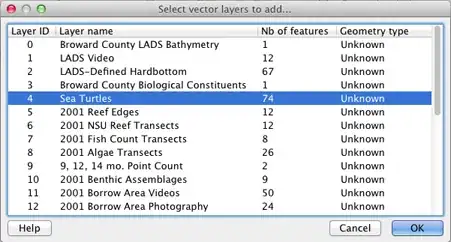
If the .kmz has multiple layers, you will be presented with a layer selection dialog (single layer .kmz files are immediately loaded):
enter image description here

You can select multiple layers in that dialog to import. The Example Overlay of Multiple Datasets .kmz file I tested (from here) allowed multiple layer import of point, line and polygon layer types.


EDIT: You can check for ogr LIBKML driver support in your version of QGIS by running the following commands in QGIS's Python Console:

import osgeo.ogr
print 'Has LIBKML ogr driver: ' + str(osgeo.ogr.GetDriverByName('LIBKML') is not None)
dakcarto
  • 7,754
  • 26
  • 34
14

as far as I know, you are right: vectors in qgis are read and written by ogr. qgis 1.8 uses the lastest gdal/ogr, which is 1.91. you can read zipped shape-files, but *.kmz, which actually are a zip-archive containing *.kml-file(s) need to be unzipped manually before importing

Kurt
  • 7,087
  • 4
  • 33
  • 51
6

Here is a guide to create and import KML files into Quantum. It does not work for KMZ files so these would need to first be decompressed to be used in this manner.

sgrieve
  • 3,726
  • 1
  • 19
  • 36
3

You can add KML layers as any other kind of vector layer, using Layer .. Add Layer .. Add Vector Layer (or Ctrl-Shift-V).

Giovanni Manghi
  • 3,907
  • 16
  • 24
2

Once you have opened the KML file in QGIS, you can also save it as a shapefile by right-clicking on the file in the layers pane and selecting 'save as'.

Bernie
  • 653
  • 6
  • 12
0

I have QGIS 2.18 and you can add a *.kmz file.

Ariel
  • 315
  • 2
  • 13
0

Rename datafile.kmz to datafile.zip then unzip the *.kml from inside.

Lorlin
  • 117
  • 2
-2

The solution is simple:

  1. in Google Earth, right-click on your loaded *.kmz file

  2. choose "save as..." and save the file as *kml

  3. Now, open the kml-file with QGIS

Tipp: if you want to save several *.kmz files and merge them in one sinlge *kml file, put your *.kmz files in Google Earth in one single folder in hte "locations" window of Google Earth. Than apply the procedure described above for the folder. One single *kml with all geogrpahic points in the folder will be produced, you can then open it with QGis.

If "on the fly projection" is activated, the points will show up on the right place in your OpenLayers Map in QGIS.

-3

First Open In Google Earth And Save As Kml Format File and That you will open in QGIS 1.8.... open Vector Data File Change kml format...