I need help with merging two different tables in QGIS. First table is normal atribute table for spatial layer. Second table is text .dbf file without geometry. I cant use "join" feature, because in text file I have more (two or three) lines to one line in spatial layer. In ArcView 3 is "Link" feature and in ArcGis 3.2 is "Relate" feature. In QGIS I am helpless.
-
This may help: Joining multiple records to single feature using QGIS? I like the Virtual Layer way posted by underdark. – Kazuhito Feb 10 '18 at 12:15
2 Answers
Not a direct answer, but I would like to recommend Virtual Layer suggested by underdark.
For your case:
(1) Go to Layer | Add Layer | Add/Edit Virtual Layer and import both layers.
(2) Query is
SELECT aaa.*, bbb.*
FROM aaa CROSS JOIN bbb
ON aaa.SEGMENT_ID = bbb.SEGMENT_ID
Please replace aaa and bbb with real layer name, as appear in the Local name.
If you open the attribute table of the newly created layer, called virtual layer, it will be like below image.
Sorry for my posting multiple answers... but again, I really recommend this approach.
- 30,746
- 5
- 69
- 149
The Link and Relate function you are looking for is called Relation in QGIS. It is suggested by antrin in this Q&A, which finally links it up to Matthias Kuhn's blog site.
To keep the answer stay within this GIS-SE, let me try to summarize the steps to be taken. (If you have already read these links, there is nothing new in this answer).
(1) Assume your data has aaa point layer and bbb dbf layer, with SEGMENT_ID fields as KEY identifier.
(2) Go to menu Project | Project Properties and open Relations tab.
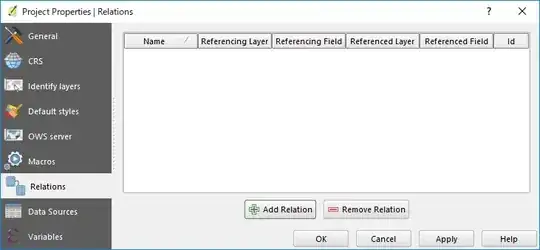
(3) Click on [ + ] Add Relation button. In the 1:N (parent to child) relationship, your point layer (single record) is the parent and dbf (many records) is the child. [OK] to close.
(4) Reopening the aaa attribute table may not look different. Then click on the Switch to form view (at the lower right corner).
(5) Form view shows the relationship between aaa and bbb.
- 30,746
- 5
- 69
- 149


