I have a feeling I'm either trying to do this incorrectly, or I'm just not searching for the correct terms, but I cannot figure out how to do what I want to do.
I am trying to plot the ranges of fish species (shapefile #1) in Maryland/Delaware/Virginia superimposed over the state maps, then add major rivers (shapefile #2) in R.
I have no trouble getting everything plotted, but since both shapefiles are for the entire United States, they plot polygons/lines on my maps outside the MD/DE/VA region that I'm interested in.
Here's what I've done so far in R:
> library(maps)
> library(maptools)
> library(scales)
> mudsunfish=readShapePoly("~/Desktop/Maryland/Acantharchus_pomotis.shp")
> map('state', regions=c('maryland', 'virginia', 'delaware'), lwd=3)
> plot(mudsunfish, add=TRUE, col=alpha("skyblue", 0.3), border=FALSE)
This gives me the below image (not worried about the rivers in this instance):
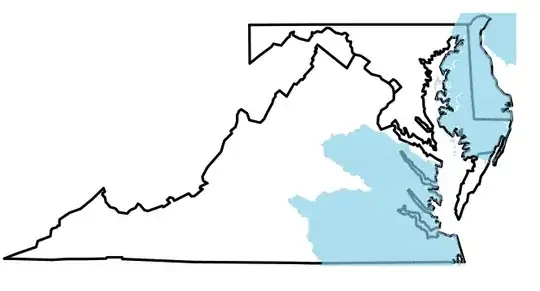
Notice the blue shading in the upper right, where New Jersey and Pennsylvania would be. I don't want that. I can remove the shading in Photoshop, but with >120 species and rivers to add, I'd like to not have to do that.
How can I limit my shapefiles to the borders of the states? Should I be going about this with different packages? I'm sure someone else has run into this before, but I'm at a loss for what phrase(s) to Google to find my answer.


