16

ESRI Support say they have reproduced the issue and have opened a bug report (NIM070156).

I have determined that there is a memory leak (in unmanaged heap memory) that occurs when a tool in my .NET/C# ArcMap add-in performs a spatial query (returning an ICursor from IFeatureClass.Search with an ISpatialFilter query filter). All COM objects are being released as soon as they are no longer needed (using Marshal.FinalReleaseCOMObject).

To determine this I first set up a PerfMon session with counters for ArcMap.exe's Private Bytes, Virtual Bytes and Working Set, and noted that all three steadily increased (by roughly 500KB per iteration) with each usage of the tool that that performs the query. Crucially, this only occurs when performed against feature classes on SDE using direct connect (ST_Geometry storage, Oracle 11g client and server). The counters remained constant when using a file geodatabase, as well as when connecting to an older SDE instance that uses application connect.

I then used LeakDiag and LDGrapher (with some guidance from this blog post) and logged the Windows Heap Allocator at three times: when I first load ArcMap and select the tool to initialize it, after running the tool a couple dozen times, and after running it a few more dozen times.

Here are the results as shown in LDGrapher's default view (total size): LDGrapher graph showing steady increase on memory usage
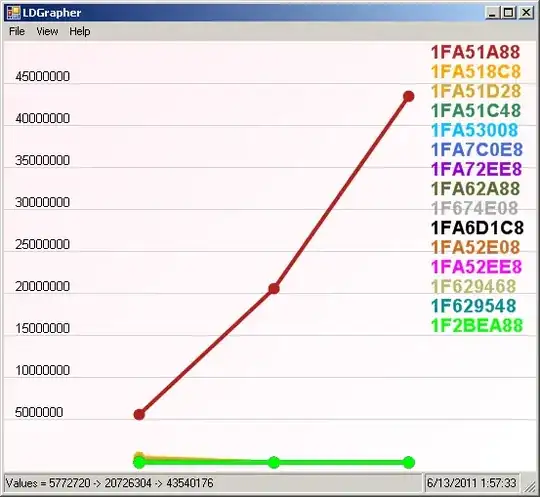
Here is the call stack for the red line: Call stack showing sg.dll call to SgsShapeFindRelation2 function

As you can see the SgsShapeFindRelation2 function in sg.dll appears to be what is responsible for the memory leak.

As I understand sg.dll is the core geometry library used by ArcObjects, and SgsShapeFindRelation2 is presumably where the spatial filter is being applied.

Before I do anything else, I just wanted to see if anyone else had run into this issue (or something similar) and what if anything they were able to do about it. Also what could be the reason for this occurring only with direct connect? Does this sound like a bug in ArcObjects, a configuration issue, or a programming problem?

Here is a minimal working version of the method that produces this behavior:

private string GetValueAtPoint(IPoint pPoint, IFeatureClass pFeatureClass, string pFieldName)
{
    string results = "";
    ISpatialFilter pSpatialFilter = null;
    ICursor pCursor = null;
    IRow pRow = null;
    try
    {
        pSpatialFilter = new SpatialFilterClass();
        pSpatialFilter.Geometry = pPoint;
        pSpatialFilter.GeometryField = pFeatureClass.ShapeFieldName;
        pSpatialFilter.SpatialRel = esriSpatialRelEnum.esriSpatialRelIntersects;
        pSpatialFilter.SearchOrder = esriSearchOrder.esriSearchOrderSpatial;
        pCursor = (ICursor)pFeatureClass.Search(pSpatialFilter, false);
        pRow = pCursor.NextRow();
        if (pRow != null)
            results = pRow.get_Value(pFeatureClass.FindField(pFieldName)).ToString();
    }
    finally
    {
        // Explicitly release COM objects
        if (pRow != null)
            Marshal.FinalReleaseComObject(pRow);
        if (pCursor != null)
            Marshal.FinalReleaseComObject(pCursor);
        if (pSpatialFilter != null)
            Marshal.FinalReleaseComObject(pSpatialFilter);
    }
    return results;
}

Here's my workaround code based on the discussion below with Ragi:

private bool PointIntersectsFeature(IPoint pPoint, IFeature pFeature)
{
    bool returnVal = false;
    ITopologicalOperator pTopoOp = null;
    IGeometry pGeom = null;
    try
    {
        pTopoOp = ((IClone)pPoint).Clone() as ITopologicalOperator;
        if (pTopoOp != null)
        {
            pGeom = pTopoOp.Intersect(pFeature.Shape, esriGeometryDimension.esriGeometry0Dimension);
            if (pGeom != null && !(pGeom.IsEmpty))
                returnVal = true;
        }
    }
    finally
    {
    // Explicitly release COM objects
        if (pGeom != null)
            Marshal.FinalReleaseComObject(pGeom);
        if (pTopoOp != null)
            Marshal.FinalReleaseComObject(pTopoOp);
    }
    return returnVal;
}

private string GetValueAtPoint(IPoint pPoint, IFeatureClass pFeatureClass, string pFieldName)
{
    string results = "";
    ISpatialFilter pSpatialFilter = null;
    IFeatureCursor pFeatureCursor = null;
    IFeature pFeature = null;
    try
    {
        pSpatialFilter = new SpatialFilterClass();
        pSpatialFilter.Geometry = pPoint;
        pSpatialFilter.GeometryField = pFeatureClass.ShapeFieldName;
        pSpatialFilter.SpatialRel = esriSpatialRelEnum.esriSpatialRelEnvelopeIntersects;
        pFeatureCursor = pFeatureClass.Search(pSpatialFilter, true);
        pFeature = pFeatureCursor.NextFeature();
        while (pFeature != null)
        {
            if (PointIntersectsFeature(pPoint, pFeature))
            {
                results = pFeature.get_Value(pFeatureClass.FindField(pFieldName)).ToString();
                break;
            }
            pFeature = pFeatureCursor.NextFeature();
        }
    }
    finally
    {
        // Explicitly release COM objects
        if (pFeature != null)
            Marshal.FinalReleaseComObject(pFeature);
        if (pFeatureCursor != null)
            Marshal.FinalReleaseComObject(pFeatureCursor);
        if (pSpatialFilter != null)
            Marshal.FinalReleaseComObject(pSpatialFilter);
    }
    return results;
}
PolyGeo
  • 65,136
  • 29
  • 109
  • 338
blah238
  • 35,793
  • 7
  • 94
  • 195

3 Answers3

6

This looks like a bug.

SG contains the ArcSDE geometry libraries and not the ArcObjects geometry libraries... it is used as a pre-filter before the test hits the ArcObjects geometry libraries.

Try this:

Omit this line:

pSpatialFilter.SearchOrder = esriSearchOrder.esriSearchOrderSpatial;

and since you are not saving a reference to the row, there is no need for you not to use recycling cursors, so switch the false flag to true.

pCursor = (ICursor)pFeatureClass.Search(pSpatialFilter, true);

You should see an improvement both in memory consumption and runtime speed. Nevertheless, if the bug is still hit, this will hopefully dramatically delay it :)

PolyGeo
  • 65,136
  • 29
  • 109
  • 338
Ragi Yaser Burhum
  • 15,339
  • 2
  • 59
  • 76
  • 1
    Thanks @Ragi -- I tried both modifications but there was no change in the rate of memory being leaked. – blah238 Jun 13 '11 at 21:38
  • can you try 2 tier (direct connect) vs 3 tier (application server) connection? provided that you have the application server already running, this should only be a change in the sde connection string. – Ragi Yaser Burhum Jun 13 '11 at 22:30
  • oh, just saw kirk's comment, so it is a direct connect issue. IMHO, if you did this with 3 tier, there is the possiility that you would see the leak on the server side, but the client wold stay the same. May I ask if you are doing anything with editsessions or cloning geometries? – Ragi Yaser Burhum Jun 13 '11 at 22:35
  • Nope, just getting values from the cursor. With application connect there is no memory leak (on the client side), it only shows up with direct connect. – blah238 Jun 13 '11 at 23:18
  • During direct connect, the arcsde code that would normally run in the server is actually run inproc in the client(since the sde dlls are actually also installed on the client to support this mode). Ironically, it seems you are seeing what would normally be a server side bug, in the client (because of how direct connect works). – Ragi Yaser Burhum Jun 14 '11 at 05:47
  • Interesting insights -- but if there was a memory leak on the server involving something as routine as getting values from a cursor I'd think things would have been crashing and burning already! – blah238 Jun 14 '11 at 17:31
  • 1
    Well, yes and no. The 3 tier mode, the giomgr stays resident and for every connection it spawns a new gsrvr process that will die after your disconnect, so if the leak was there, it would go away after you disconnected. Also, we can't discount the fact that direct connect does have a very slightly different code path... Try two things. One, just switch the spatial filter completely off and return the first feature an then try just esriSpatialRelEnvelopeIntersects. I know that semantically none of these are the same, but we want to track the leak first. – Ragi Yaser Burhum Jun 14 '11 at 23:37
  • @Ragi, I tried both adjustments -- in both cases the rate of memory increase was reduced to basically negligible levels (without more thorough testing I can't say whether there is still a small memory leak or not). Does this help narrow it down at all? – blah238 Jun 15 '11 at 19:12
  • 3
    Yeah, so both methods are avoiding the call sgShapeFindRelation2. Try this now, esriSpatialRelEnvelopeIntersects on the spatial filter to make sde do a super basic pre-filtering, and then ITopologicalOperator::intersect to do the actual test on the client. This may not be as efficient as the sgShapeFindRelation2, but it will avoid hitting that function and hence avoid the leak. – Ragi Yaser Burhum Jun 16 '11 at 05:16
  • That worked! Unfortunately my real code needs to use the cursor directly to use IDataStatistics.UniqueValues on it so I would have to implement something different, but this is a good workaround. – blah238 Jun 16 '11 at 19:17
  • Do ya'll have a Nimbus ID for this by the way? And let me know if I can provide anything else or if I need to submit a bug report. – blah238 Jun 16 '11 at 19:19
  • Haha, you will have to ask ESRI customer support. I am just a mere mortal hahaha. – Ragi Yaser Burhum Jun 16 '11 at 19:27
4

If anyone is still interested in this, it was fixed at Version 10.1.

ESRI Technical Support Number: NIM070156 and NIM062420

http://support.esri.com/en/bugs/nimbus/TklNMDcwMTU2 http://support.esri.com/en/bugs/nimbus/TklNMDYyNDIw

travis
  • 1,910
  • 17
  • 21
  • It doesn't list anything for Version Fixed so I guess I'll just have to take your word for it. I haven't tested at 10.1 though. Also the issue in my bug report has nothing to do with labeling so not sure why they marked it as a duplicate of that other one. – blah238 Mar 16 '13 at 02:22
1

You could try the following pattern instead of try / finally { Marshal.FinalReleaseComObject(...) }:

using (ESRI.ArcGIS.ADF.ComReleaser cr) {
    var cursor = (ICursor) fc.Search(...);
    cr.ManageLifetime(cursor);
    // ...
}

Also working with Direct Connect, I've had some success in loops by forcing System.GC.Collect() periodically (every so-many iterations), however nasty it looks.

PolyGeo
  • 65,136
  • 29
  • 109
  • 338
  • I did give the ComReleaser approach a shot using James MacKay's method for recycling cursors described here: http://forums.arcgis.com/threads/4298-What-s-Up-with-ComReleaser-Is-it-really-working?p=12916&viewfull=1#post12916 -- it didn't make any difference (it just wraps Marshal.ReleaseCOMObject anyways so not too surprising). I have also tried using GC.Collect but it also had no effect. I should have mentioned I also looked at managed memory using a couple of .NET profilers and none of them found any managed objects or managed memory piling up, leading me to look at unmanaged memory. – blah238 Jun 14 '11 at 17:17