13

I use the Amazon Cloud Reader and PC Reader, but I can only view books purchased through Amazon in them. In fact, it won't let me deliver other books - those I emailed to Amazon for conversion or created in some other way, like using the Chrome extension - to those readers, at all. See the image for what I run into when I try to deliver one of these books, which was converted using Send-By-Email, from the "Manage My Kindle" area of amazon.com.
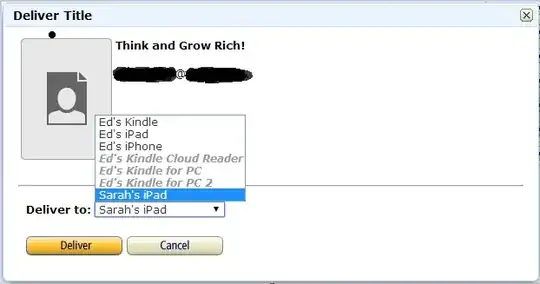
enter image description here

I found a post on an Amazon forum thread stating that the Cloud Reader doesn't support personal documents, but it's over a year old. I can't help but think that I'm doing something wrong and missing some way to get these docs into the cloud and/or on my PC.

Is there a way to deliver these docs to Cloud Reader and PC Reader?

elixenide
  • 2,204
  • 2
  • 19
  • 37
  • @JamesJenkins I'm familiar with Calibre, but how would it enable me to get these books into the Amazon PC Reader or Cloud Reader? They are already on my other devices. – elixenide Feb 13 '14 at 23:16
  • Not sure that link is the best way to the solution, so I posted this I have read about, here and there but never tried it. – James Jenkins Feb 13 '14 at 23:26
  • Thanks for the suggestion; I will keep it in mind if I ever decide to go the personal cloud route. Right now, though, I just want to be able to read my books on all my devices using the existing apps. – elixenide Feb 14 '14 at 01:12

1 Answers1

1

New (April 2014) Solution:

  1. Go to Amazon Cloud Drive (https://www.amazon.com/clouddrive/).
  2. Select documents (one-at-a-time only) and click Download.

Old Solution that can work without Internet Access:

  1. Deliver the documents/books to your iPhone or iPad Kindle.
  2. Download & install an app such as iFunBox Classic (free). This app allows you to explore your iPhone files with no jailbreak required.
  3. Plug your iPhone/iPad into PC via USB and start iFunBox Classic.
  4. In iFunBox, navigate to "User Applications/Kindle/Library".
  5. Here, every "book" on your Kindle is listed with nonsensical filenames such as "UQCTNAXOJZDZPWDA7GY5GKF52NMNEIU6_PDOC.azw". However, since you just delivered your chosen books, you can sort by date and it will be easy to select the ones you want.
  6. Drag-and-drop, or select and click "Copy to PC", to get these files onto your PC.

Now you can open them in Kindle for PC, and also Kindle for Mac I believe. Cloud reader is probably a lost cause.

Background Info:

As you have discovered, Amazon frustratingly considers any book not purchased through them as a "personal document" with many limitations, including that they do not sync annotations nor highlights, and you cannot deliver them to PC or Cloud Kindle.

Extra Tip:

I also use iFunBox to back up my annotations/highlights, contained in the file "AnnotationStorage" located also at "User Applications/Kindle/Library". This is an SQL database and can be read with a free app such as SQLiteBrowser.

  • 1
    I could not find my PDF documents, which I uploaded from my computer using "send to Kindle", inside my Amazon Drive. I could find and download them from "Manage Your Content and Devices" https://www.amazon.com/mycd – Nate Anderson Aug 07 '16 at 00:11