When you initially open your PDF file in your favorite PDF reader, the "open"/"closed" option determines whether the bookmark is by default expanded (open) or not (closed).
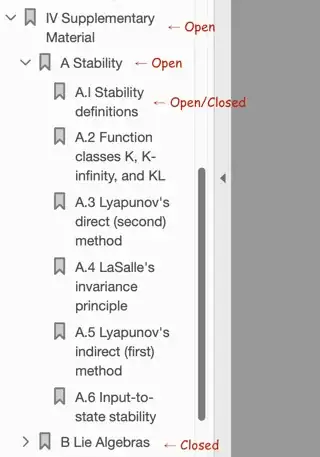
For example, in the image above, the bookmarks "IV Supplementary Material" and "A Stability" are expanded/open/sit next to a "⋎", and the bookmark "B Lie Algebras" is non-expanded/closed/sits next to a ">". The bookmarks A.1–A.6, having no children, can be legitimately be considered as open or as closed. (By the way, "A.l" is a typo and should be "A.1".)
Note that this feature may work in some apps and fail in other apps. On my Mac, it works in Adobe Acrobat Reader DC (shown above) and Foxit PDF Reader but not in Preview. Preview displays all bookmarks as closed regardless.
Source: The JPdfBookmarks 2.0.0 release page mentions "the open/closed state". I then looked at the JPdfBookmarks dumps for a couple of PDFs and inferred the above answer. (Unfortunately, I don't have confirmation from any "legit" source.)


