7

My KT stopped working all of a sudden and will no longer turn on. I have tried the holding down the power button trick numerous times and charged it for over 24 hours but there is still no response. I also tried using Kubrick but when I boot into it, the wizard doesn't start automatically and I can't figure out how to run it manually.

Sorry about the quality of screenshot but this is where kubrick stops.
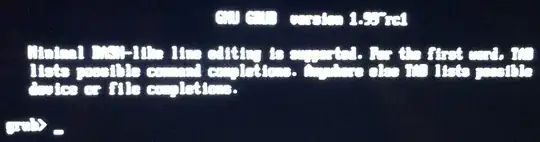
Screenshot

Anybody have experience with this situation?

doovers
  • 171
  • 5
  • Do you get a charge indicator light when charging? – James Jenkins Jan 29 '14 at 12:05
  • @JamesJenkins Yes but it seems to be a bit random as to which colour the light is. It's mostly orange but has gone green and back to orange and sometimes no light, all on the same charge... – doovers Jan 29 '14 at 13:01
  • Can you specify how exactly the wizard does not start? Are there any error messages? Do you see something like kubrick login: or root@kubrick:~#? – Tim Jan 30 '14 at 11:34
  • Also a very simple workaround would be to try the live cd on another pc. – Tim Jan 30 '14 at 11:48
  • @Tim I don't have access to another PC at the moment unfortunately but I've added a screenshot of where the kubrick boot disk stops. Hitting tab displays a list of commands, some of which I've tried but nothing has happened. – doovers Jan 30 '14 at 12:10
  • 1
    @doovers This basically means that the livecd is not booted (its bootloader does not find something). I suggest we should try to troubleshoot in chat instead of discussing in the comments. – Tim Jan 30 '14 at 12:20
  • @Tim sounds good how do I start chat? – doovers Jan 30 '14 at 12:27
  • @doovers [I created a new room.]http://chat.stackexchange.com/rooms/12754/kubrick-troubleshooting – Tim Jan 30 '14 at 12:35
  • @Tim I've tried a number of ways to get kubrick to work such as USB CD and finally parallels VM which was the only one that actually ran the wizard but despite the wizard running it hangs on the 'Putting device into fast boot mode' screen showing waiting for device... any ideas? – doovers Feb 01 '14 at 09:09
  • @Tim Managed to get one step passed that with a new cable but at the point where I'm prompted to make a selection on the screen, there is nothing but a blank display... – doovers Feb 03 '14 at 07:41
  • @doovers The readme explicitely states that you should Make sure that you are performing steps 3 and 4 with physical hardware, i.e., on a real computer, and with a real CD/DVD or USB stick, not in a virtual machine!, so do not use a VM. I do not really understand at which point you are. Has Kubrick already booted and is the wizard started? – Tim Feb 03 '14 at 12:30

1 Answers1

2

It may be that your battery has burst. That would be the most likely cause of an abrupt breakdown. If the device is no longer under warranty, I'd suggest opening it up (check for videos on YouTube) and having a look. Replacement batteries are easily obtainable and, if you can operate a screwdriver, putting one in is within any user's capability.

Roger_S
  • 468
  • 3
  • 7
  • 1
    Thank you for the suggestion. One question though, if the battery was goosed, would the kindle show up intermittently as a USB device when plugged in to my laptop? – doovers Jan 30 '14 at 21:35
  • I don't know. But I speculate there is an intermediate state between "OK" and "complete failure" that might permit that. – Roger_S Feb 03 '14 at 19:39