7

I used to sync my personal documents to my Kindle via Amazon website "Manage my Kindle". Unfortunately there has been an update to Amazon’s website and there, under Manage my Kindle, I simply cannot find any link to my Personal documents.

I can only see the purchases I made, but not the files I sent via the Kindle mail.
Any hint where to go?

Michal
  • 193
  • 9

2 Answers2

2

So I finally found it buried under out-dated UX unfriendly and super stealthy drop-down menu! Special thanks goes to Ed who inspired me to look for a drop-down.

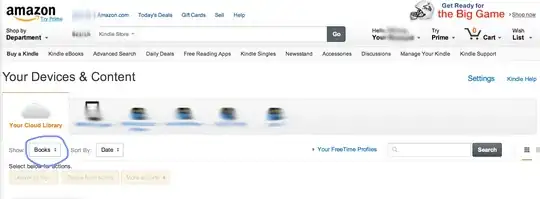
enter image description here

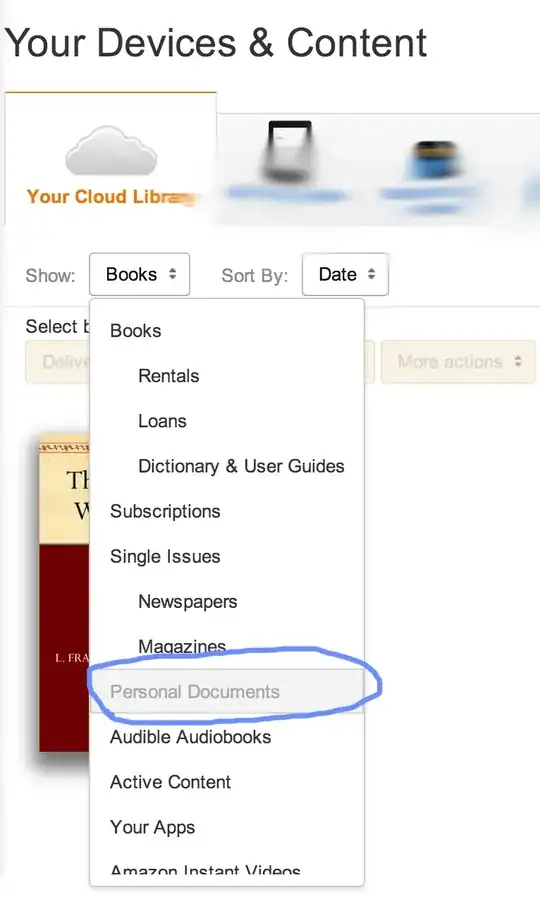
Highlighted in blue circle is the hidden menu (almost like an easter-egg). From there simply navigate to:

enter image description here

And they lived happily ever after...until Amazon updated their website AGAIN! :-)

Michal
  • 193
  • 9
1

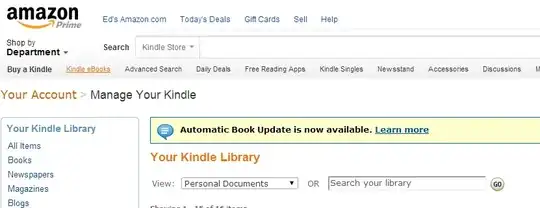
It's in a dropdown, now. Go to Your Account > Manage Your Kindle and you should see a screen like this:

enter image description here

The dropdown on the left (next to View) is what you're looking for.

elixenide
  • 2,204
  • 2
  • 19
  • 37
  • Yes and no. I found it, but it looks nothing like the screen you showed. But you gave me sort of a hint :-) – Michal Jan 30 '14 at 21:58
  • 1
    Interesting. I'm glad I helped you along. Please consider posting your own answer to tell others how to solve the problem! – elixenide Jan 30 '14 at 22:05