I need to open up my Windows 8 Kindle app and while reading a book, I want to cut and paste certain passages to a Word document. I did this before a while back but can't seem to do it again (or remember how I did it before). I used the dual screen that Windows 8 allows and then highlighted the passages and somehow copy and pasted them into the Word document. I think I used the Ctrl+c to copy and the Ctrl+v to paste, but that doesn't work. Any suggestions?
Asked
Active
Viewed 1.5k times


3 Answers
1
You can't do it directly from the desktop reader app for Windows 8.
You can, however, do one of the following things instead:
1. Use Kindle Cloud Reader
- Highlight the text you want to copy.
- Go to https://kindle.amazon.com/your_highlights and find the highlight in question.
- Copy and paste the text from there.
Of course, use this within the limits of copyright, etc.
See this related question about essentially the same thing.
2. Use the Windows 7 app
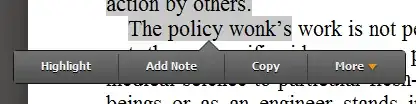
If you can stand the non-Metro layout, you can run the Windows 7 app on Windows 8 (see this discussion. The Windows 7 app allows copying: when you highlight text and right click, "Copy" is one of the options:


-
2On version 1.10.8 you can't copy anymore. "Copy" has been replaced by "Search". – Gabriel Nov 17 '14 at 12:19
0
It is a crap solution but if you select and search you can then copy from the search window.
Why Amazon wants to make it that hard I don't know. The old copy function included the reference which was quite useful.

user5903
- 1
0
In your Amazon account when you purchase a kindle book, download it "your PC" I was unable to copy and paste when downloading electronic books to my windows 8,10, to my tablet, but when I selected download to "your PC " it worked without a problem. The kindle for PC app has a bluish background, thats that app I use, the kindle app with the black background would not allow me to copy and paste, but the kindle for PC app does

Corey
- 1