I have a legacy MS SQL Server database where all the primary and foreign keys were created as indexes. I am developing the new version of our software with Entity Frameworks, which I have learned expects every table to have a primary key. So I have to convert every PK and probably every FK index to a key.
When I tried one key at a time, I found that before converting a PK I have to find and drop ALL FK indexes.
Is there a good way to make an MS SQL script to convert the indexes as a batch? Or do I have to do the manual approach and build a script to drop each index, build all the PKs, then build all the FKs?
(I'm running MS SQL Server 2012.)
ETA the script I tried and its errors.
/****** Object:  Index [FK_PROJECT_ORGANIZATION]    Script Date: 7/16/2014 10:07:13 AM ******/
DROP INDEX [FK_PROJECT_ORGANIZATION] ON [dbo].[PROJECT]
GO

/****** Object:  Index [PK_ORGANIZATION]    Script Date: 7/16/2014 9:23:54 AM ******/
DROP INDEX [PK_ORGANIZATION] ON [dbo].[ORGANIZATION] WITH ( ONLINE = OFF )
GO

ALTER TABLE [dbo].[ORGANIZATION] ADD  CONSTRAINT [PK_ORGANIZATION] PRIMARY KEY CLUSTERED
(
    [organization_id] ASC
)WITH (PAD_INDEX = OFF, STATISTICS_NORECOMPUTE = OFF, IGNORE_DUP_KEY = OFF, ALLOW_ROW_LOCKS = ON, ALLOW_PAGE_LOCKS = ON) ON [PRIMARY]
GO


/****** Object:  Index [FK_PROJECT_ORGANIZATION]    Script Date: 7/16/2014 10:07:13 AM ******/
--Re-create the index as a foreign key
ALTER TABLE [dbo].[PROJECT]  WITH CHECK ADD  CONSTRAINT [FK_PROJECT_ORGANIZATION] FOREIGN KEY([organization_id])
REFERENCES [dbo].[ORGANIZATION] ([organization_id])
GO

ALTER TABLE [dbo].[PROJECT] CHECK CONSTRAINT [FK_PROJECT_ORGANIZATION]
GO
The error messages:
Msg 3723, Level 16, State 6, Line 3
An explicit DROP INDEX is not allowed on index 'dbo.ORGANIZATION.PK_ORGANIZATION'. It is being used for FOREIGN KEY constraint enforcement.
Msg 1913, Level 16, State 1, Line 2
The operation failed because an index or statistics with name 'PK_ORGANIZATION' already exists on table 'dbo.ORGANIZATION'.
Msg 1750, Level 16, State 0, Line 2
Could not create constraint. See previous errors.
ETA2: The CREATE TABLE script: (ETA3 - the script generated from the legacy database.)
/****** Object:  Table [dbo].[ORGANIZATION]    Script Date: 7/16/2014 12:22:47 PM ******/
SET ANSI_NULLS ON
GO

SET QUOTED_IDENTIFIER ON
GO

SET ANSI_PADDING ON
GO

CREATE TABLE [dbo].[ORGANIZATION](
    [organization_id] [int] IDENTITY(1,1) NOT NULL,
    [user_name] [varchar](50) NULL,
    [user_phone] [varchar](30) NULL,
    [user_email_address] [varchar](50) NULL,
    [user_password] [varchar](50) NULL,
    [org_type] [varchar](20) NULL,
    [status] [varchar](20) NULL,
    [company] [varchar](100) NULL,
    [address_1] [varchar](40) NULL,
    [address_2] [varchar](40) NULL,
    [address_3] [varchar](40) NULL,
    [city] [varchar](40) NULL,
    [state_code] [varchar](10) NULL,
    [postal_code] [varchar](25) NULL,
    [business_poc_name] [varchar](50) NULL,
    [business_poc_title] [varchar](50) NULL,
    [business_poc_phone] [varchar](30) NULL,
    [business_poc_cell] [varchar](30) NULL,
    [business_poc_email_address] [varchar](50) NULL,
    [business_poc_city] [varchar](40) NULL,
    [business_poc_state_code] [varchar](10) NULL,
    [url] [varchar](50) NULL,
    [datetime_created] [smalldatetime] NULL
) ON [PRIMARY]

GO

SET ANSI_PADDING OFF
GO

/****** Object:  Index [PK_ORGANIZATION]    Script Date: 7/16/2014 12:22:47 PM ******/
CREATE UNIQUE CLUSTERED INDEX [PK_ORGANIZATION] ON [dbo].[ORGANIZATION]
(
    [organization_id] ASC
)WITH (PAD_INDEX = OFF, STATISTICS_NORECOMPUTE = OFF, SORT_IN_TEMPDB = OFF, IGNORE_DUP_KEY = OFF, DROP_EXISTING = OFF, ONLINE = OFF, ALLOW_ROW_LOCKS = ON, ALLOW_PAGE_LOCKS = ON) ON [PRIMARY]
GO

SET ANSI_PADDING ON

GO

/****** Object:  Index [IX_ORGANIZATION_company]    Script Date: 7/16/2014 12:22:47 PM ******/
CREATE NONCLUSTERED INDEX [IX_ORGANIZATION_company] ON [dbo].[ORGANIZATION]
(
    [company] ASC
)WITH (PAD_INDEX = OFF, STATISTICS_NORECOMPUTE = OFF, SORT_IN_TEMPDB = OFF, DROP_EXISTING = OFF, ONLINE = OFF, ALLOW_ROW_LOCKS = ON, ALLOW_PAGE_LOCKS = ON) ON [PRIMARY]
GO

SET ANSI_PADDING ON

GO

/****** Object:  Index [IX_ORGANIZATION_organization_id_org_type]    Script Date: 7/16/2014 12:22:47 PM ******/
CREATE NONCLUSTERED INDEX [IX_ORGANIZATION_organization_id_org_type] ON [dbo].[ORGANIZATION]
(
    [organization_id] ASC,
    [org_type] ASC
)WITH (PAD_INDEX = OFF, STATISTICS_NORECOMPUTE = OFF, SORT_IN_TEMPDB = OFF, DROP_EXISTING = OFF, ONLINE = OFF, ALLOW_ROW_LOCKS = ON, ALLOW_PAGE_LOCKS = ON) ON [PRIMARY]
GO

SET ANSI_PADDING ON

GO

/****** Object:  Index [IX_ORGANIZATION_user_email_address]    Script Date: 7/16/2014 12:22:47 PM ******/
CREATE NONCLUSTERED INDEX [IX_ORGANIZATION_user_email_address] ON [dbo].[ORGANIZATION]
(
    [user_email_address] ASC
)WITH (PAD_INDEX = OFF, STATISTICS_NORECOMPUTE = OFF, SORT_IN_TEMPDB = OFF, DROP_EXISTING = OFF, ONLINE = OFF, ALLOW_ROW_LOCKS = ON, ALLOW_PAGE_LOCKS = ON) ON [PRIMARY]
GO

SET ANSI_PADDING ON

GO

/****** Object:  Index [IX_ORGANIZATION_user_name]    Script Date: 7/16/2014 12:22:47 PM ******/
CREATE NONCLUSTERED INDEX [IX_ORGANIZATION_user_name] ON [dbo].[ORGANIZATION]
(
    [user_name] ASC
)WITH (PAD_INDEX = OFF, STATISTICS_NORECOMPUTE = OFF, SORT_IN_TEMPDB = OFF, DROP_EXISTING = OFF, ONLINE = OFF, ALLOW_ROW_LOCKS = ON, ALLOW_PAGE_LOCKS = ON) ON [PRIMARY]
GO

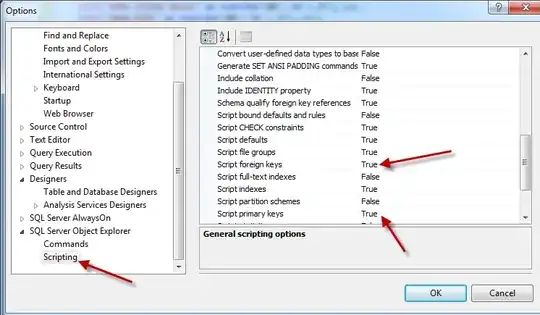

CREATE TABLEscript. It seems your table already has PK and FK constraints. – ypercubeᵀᴹ Jul 16 '14 at 15:31organization_idfield is specified asIDENTITY(1,1). Could this be significant? – Codes with Hammer Jul 16 '14 at 15:37CREATE TABLEfrom the Management Studio (right click, then Script Table as > CREATE To > New Query Editor Window)? – ypercubeᵀᴹ Jul 16 '14 at 15:41true. I set "script indexes" totrueas well. – Codes with Hammer Jul 16 '14 at 15:51ALTERstatements. Are you sure you have only one database and not two (running the ALTER in one but getting the scripts from the other)? – ypercubeᵀᴹ Jul 16 '14 at 15:57UNIQUEand some other indexes. Does theProjecttable also haveFOREIGN KEYconstraints? – ypercubeᵀᴹ Jul 16 '14 at 16:29