I have a ton of configured connections listed in the Server Groups, is there a way I can save this? not just save the passwords but the Server Group Settings
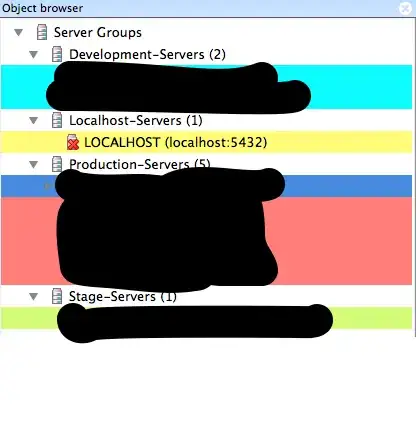
I have a ton of configured connections listed in the Server Groups, is there a way I can save this? not just save the passwords but the Server Group Settings

Under Windows, pgAdmin4 stores the server list in the users directory in a SQLLite 3 format. Here:
%UserProfile%\AppData\Roaming\pgAdmin\pgadmin4.db
Under Windows this information is stored in the Registry under the key:
HKEY_CURRENT_USER\Software\pgAdmin III
In Linux systems I would expect some file in the user home directory.
In Ubuntu 13.10 pgAdmin stores configuration in user's home directory:
/home/<<username>>/.pgadmin3
or shorter
~/.pgadmin3
Note that this file is hidden, so you may need to enable some kind of "Show hidden files" option in your file manager.

I ran into a similar issue where I was on OSX and now have a windows computer. I don't want to have to re-enter all of the connection entries. I found out that on OSX the PGADMIN III servers list is located in your home user directory inside the file "pgadmin3 Preferences":
vim ~/Library/Preferences/pgadmin3\ Preferences
Now it doesn't seem like there is an easy way to import this into a non-OSX version, however at least I should be able to copy/paste most of it into the new PGADMIN III application.
I've the same issue and solve it in this way, using this doc
Export
/path/to/python /path/to/setup.py --dump-servers /path/to/pg4_cnx.json
Output message : Configuration for x servers dumped to /path/to/pg4_cnx.json.
Import
/path/to/python /path/to/setup.py --load-servers /path/to/pg4_cnx.json
Output message : Added n Server Group(s) and x Server(s).
Under Windows (7|10), you can find "python.exe" & "setup.py" in this sub-dirs of your PgAdmin4 install : \pgAdmin 4\venv\Scripts\python.exe \pgAdmin 4\web\setup.py
Hope this help you

The argument passed to Dialect.has_table() should be a <class 'sqlalchemy.engine.base.Connection'>, got <class 'sqlalchemy.engine.base.Engine'>. Additionally, the Dialect.has_table() method is for internal dialect use only; please use ``inspect(some_engine).has_table(<tablename>>)`` for public API use.
– Brennen Sprimont
Oct 27 '21 at 14:32
C:\Program Files\pgAdmin 4\v6\python\python.exe.
– stackprotector
Mar 03 '23 at 10:34
This is works for me in Windows 11
C:\Program Files\pgAdmin 4\v6>python\python.exe web\setup.py --dump-servers C:\Users\Owner\Downloads\pgadmin_connections.json

C:\Program Files\pgAdmin 4\v6>python\python.exe web\setup.py --dump-servers C:\Users\Owner\Downloads\pgadmin_connections.json
Above command is correct and event it works for v5 ->
C:\Program Files\pgAdmin 4\v5>python\python.exe web\setup.py --dump-servers C:\Users\Owner\Downloads\pgadmin_connections.json
But to get them worked, need to make some changes as mentioned in below Four steps ->
After above steps successful completion
And you are ready to execute below command without more issues :)
python\python.exe web\setup.py --dump-servers C:\Users\Owner\Downloads\pgadmin_connections.json
By following above useful information, I solved below errors one after another on Windows10 : -
Error 1 (Initial error) ->
Traceback (most recent call last):
File "C:\Program Files\pgAdmin 4\v5\web\setup.py", line 13, in
from pgadmin.model import db, User, Version, ServerGroup, Server,
ModuleNotFoundError: No module named 'pgadmin'
Error 2 ->
Traceback (most recent call last):
File "C:\Program Files\pgAdmin 4\v5\web\setup.py", line 13, in
from pgadmin.model import db, User, Version, ServerGroup, Server,
ModuleNotFoundError: No module named 'pgadmin.model'
Error 3 -> Traceback (most recent call last): File "C:\Program Files\pgAdmin 4\v5\web\setup.py", line 15, in from pgadmin import create_app ImportError: cannot import name 'create_app' from 'pgadmin' (unknown location)
Error 4 ->
Traceback (most recent call last):
File "C:\Program Files\pgAdmin 4\v5\web\setup.py", line 13, in
from pgadmin.model import db, User, Version, ServerGroup, Server,
File "C:\Program Files\pgAdmin 4\v5\python\lib\site-packages\pgadmin_init_.py", line 36, in
from pgadmin.utils import PgAdminModule, driver, KeyManager
ModuleNotFoundError: No module named 'pgadmin.utils'
Error 5 ->
Traceback (most recent call last):
File "C:\Program Files\pgAdmin 4\v5\web\setup.py", line 13, in
from pgadmin.model import db, User, Version, ServerGroup, Server,
File "C:\Program Files\pgAdmin 4\v5\python\lib\site-packages\pgadmin_init_.py", line 38, in
from pgadmin.utils.session import create_session_interface, pga_unauthorised
File "C:\Program Files\pgAdmin 4\v5\python\lib\site-packages\pgadmin\utils\session.py", line 26, in
import config
ModuleNotFoundError: No module named 'config'
Error 6 -> Error: Path doesn't exist: 'C:\Program Files\pgAdmin 4\v5\python\Lib\site-packages\migrations'. Please use the 'init' command to create a new scripts folder.


