1

This is an extension of a question I posted here earlier, but another layer of complexity.

I'm trying to have a checkbox field within a table field be checked/unchecked from a front end form.

I've tried a number of scenarios using the example found here in the docs, but no dice.

Here is my current code:

    <table>
      {% for row in currentUser.providerPayment %}
    <tr>
        <td>Sliding scale?</td>

        {% for slidingScale in currentUser.providerPayment  %}
            {% set checked = false %}

            {% if slidingScale.selected %}
                {% set checked = true %}
            {% endif %}

            {% if not checked %}
                <input type="hidden" name="fields[providerPayment][0][col2]" value="">
            {% endif %}

            <td><input type="checkbox" value="{{ slidingScale.value }}" name="fields[providerPayment][0][col2]" {% if checked %} checked="checked"{% endif %}></td>
        {% endfor %}
    {% endfor %}
   </table>

And here is the error it's producing:
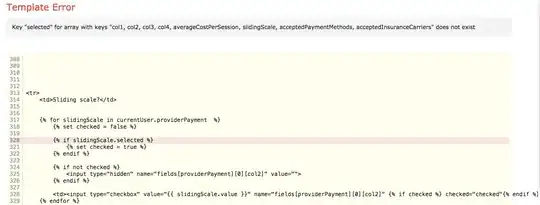
enter image description here

Update Here are my table field settings:
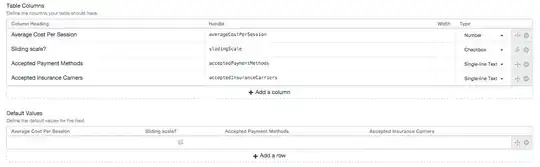
enter image description here

Matt Steele
  • 221
  • 1
  • 6

1 Answers1

2

First, when you do this:

{% for row in currentUser.providerPayment %}

    ...

    {% for slidingScale in currentUser.providerPayment %}

you’re looping through the currentUser.providerPayment array (the rows in your providerPayment Table field on the current user) within another loop through the same array. If the table has 2 rows, this is what would be happening:

  • Row 1 (assigned to row)
    • Row 1 (assigned to slidingScale)
    • Row 2 (assigned to slidingScale)
  • Row 2 (assigned to row)
    • Row 1 (assigned to slidingScale)
    • Row 2 (assigned to slidingScale)

(Doesn’t make any sense.)

You only need a single for-loop here, and it’s the outer one. Within that loop, you will be able to access all of the values on the current row, via the row variable you’ve defined:

{% for row in currentUser.providerPayment %}

    {{ row.averageCostPerSession }}
    {{ row.slidingScale }}
    {{ row.acceptedPaymentMethods }}
    {{ row.acceptedInsuranceCarriers }}

{% endfor %}

Does that make sense?

So, for each row, if you want to output a checkbox input, you would just do this:

{% for row in currentUser.providerPayment %}
    <td>
        <input type="checkbox" value="1"
            name="fields[providerPayment][0][col2]"
            {% if row.sliderScale %} checked="checked"{% endif %}>
    </td>
{% endfor %}

One thing to keep in mind with checkboxes, though, is that they don’t actually submit any POST data if left unchecked. So to be safe, you should put a hidden input right before the checkbox input, with a blank value, which will act as the default value if the checkbox is left unchecked:

{% set name = 'fields[providerPayment][0][col2]' %}

{% for row in currentUser.providerPayment %}
    <td>
        <input type="hidden" name="{{ name }}" value="">
        <input type="checkbox" name="{{ name }}" value="1"
            {% if row.sliderScale %} checked="checked"{% endif %}>
    </td>
{% endfor %}
Brandon Kelly
  • 34,307
  • 2
  • 71
  • 137