I am a complete novice.
Live Preview does not seem to be accessing the stylesheets, which are called in my _skeleton.html. My template is sample.html. I am live, not in dev environment,in case that matters. And this is a single, not channel or structure.
I have read the other questions/answers about this topic, but I haven't made changes to any code/php files, and I don't have any variables named "entry."
Here are my templates.
First, _skeleton.html.
<!DOCTYPE html>
<html xmlns="http://www.w3.org/1999/xhtml" {% block language %}{% endblock language %}>
  <head prefix="og: http://ogp.me/ns#">
    <meta charset="utf-8">
    <meta http-equiv="X-UA-Compatible" content="IE=edge">
    <meta name="viewport" content="width=device-width, initial-scale=1">
    {% block robots %}{% endblock robots %}
    <title>{% block title %}{% endblock title %}</title>
    <link rel="home" href="{{ siteUrl }}" />
    <meta name="description" {% block description %}{% endblock description %}>
    <!-- Typekit -->
    <script type="text/javascript" src="//use.typekit.net/xxx7vby.js"></script>
    <script type="text/javascript">try{Typekit.load();}catch(e){}</script>
    <!-- HTML5 shim and Respond.js IE8 support of HTML5 elements and media queries -->
    <!--[if lt IE 9]>
      <script src="https://oss.maxcdn.com/html5shiv/3.7.2/html5shiv.min.js"></script>
      <script src="https://oss.maxcdn.com/respond/1.4.2/respond.min.js"></script>
    <![endif]-->
    <link rel="canonical" {% block canonicalURL %}{% endblock canonicalURL %} />
    <link rel="icon" href="assets/images/favicon.ico">
    <!-- Bootstrap core CSS -->
    <link href="assets/bootstrap/css/bootstrap.min.css" rel="stylesheet">
    <!-- Custom styles for this template -->
    <link rel="stylesheet" href="assets/css/to-do.css">
    <!--http://ogp.me/-->
    <meta property="og:title" {% block ogTitle %}{% endblock ogTitle %}>
    <meta property="og:type" content="website" />
    <meta property="og:url" {% block ogURL %}{% endblock ogURL %} />
    <!-- <meta property="og:image" content="http://delectabl.es/assets/images/delectables-logo.png">
    <meta property="og:image:type" content="image/png">
    <meta property="og:image:width" content="???">
    <meta property="og:image:height" content="???"> -->
    <meta property="og:description" {% block ogDescription %}{% endblock ogDescription %}>
    <meta property="og:locale" {% block locale %}{% endblock locale %}>
    <meta property="og:site_name" content="{{ siteName }}">
    <!--<meta prefix="fb: http://ogp.me/ns/fb#" property="fb:app_id" content="???????????????"> -->
  </head>
  <body>
{% block contents %}{% endblock contents %}
{% include "includes/include-footer" %}
{% include "includes/include-bootstrap-core-javascript" %}
  </body>
</html>
Then, sample.html:
{% extends "_layout" %}

{% block language %}
lang="{{ entry.languageLocale }}"
{% endblock language %}

{% block robots %}
{% if entry.metaRobotsIndex.contains('index') %}
<meta name="robots" content="index">
{% endif %}
{% if entry.metaRobotsIndex.contains('noindex') %}
<meta name="robots" content="noindex">
{% endif %}
{% if entry.metaRobotsIndex.contains('noimageindex') %}
<meta name="robots" content="noimageindex">
{% endif %}
{% if entry.metaRobotsIndex.contains('none') %}
<meta name="robots" content="none">
{% endif %}
{% if entry.metaRobotsIndex.contains('follow') %}
<meta name="robots" content="index">
{% endif %}
{% if entry.metaRobotsIndex.contains('nofollow') %}
<meta name="robots" content="nofollow">
{% endif %}
{% if entry.metaRobotsIndex.contains('noarchive') %}
<meta name="robots" content="noarchive">
{% endif %}
{% if entry.metaRobotsIndex.contains('nocache') %}
<meta name="robots" content="nocache">
{% endif %}
{% if entry.metaRobotsIndex.contains('nosnippet') %}
<meta name="robots" content="nosnippet">
{% endif %}
{% if entry.metaRobotsIndex.contains('noodp') %}
<meta name="robots" content="noodp">
{% endif %}
{% if entry.metaRobotsIndex.contains('noydir') %}
<meta name="robots" content="noydir">
{% endif %}
{% endblock robots %}

{% block title %}
{{ siteName }}: {{ entry.title }}
{% endblock title %}

{% block description %}
content="{{ entry.metaDescription }}"
{% endblock description %}

{% block canonicalURL %}
href="{{ entry.url }}"
{% endblock canonicalURL %}

{% block ogTitle %}
content="{{ siteName }}: {{ entry.title }}"
{% endblock ogTitle %}

{% block ogURL %}
content="{{ entry.url }}"
{% endblock ogURL %}

{% block ogDescription %}
content="{{ entry.metaDescription }}"
{% endblock ogDescription %}

{% block locale %}
content="{{ entry.languageLocale }}"
{% endblock locale %}

{% block contents %}
    <div class="container-fluid">
      <div class="row">
        <div class="col-xs-10 col-xs-offset-1">
          <article>
            <header>
              <h1>{{ entry.heading }}</h1>
            </header>
            <div>
              {{ entry.body }}
            </div>
          </article>
        </div>
      </div>
    </div>
{% endblock contents %}
The page is live (ignore the ugly styling). You can see it at delectabl.es/sample.
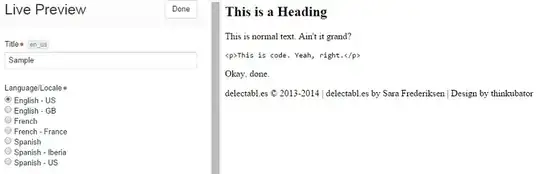
On Live Preview it looks like this:
What am I missing?
Thank you.
Lora at Two Sigma

