In the CMS the progress indicator for tasks is stuck and not completing its jobs. What can I do to resolve this?
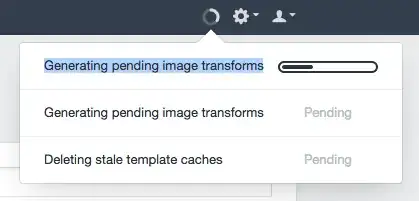
In the CMS the progress indicator for tasks is stuck and not completing its jobs. What can I do to resolve this?

More of a "How do I debug stuck tasks" answer, but it should help you.
Open up your craft_tasks table. You'll see one task in with a 'status' of 'running' and if you refresh the table several times, the 'currentStep' value for that task is no longer incrementing. That's your stuck task.
Set that task's status to 'pending', and reload any page in the control panel to re-trigger the task.
If it gets stuck again, immediately go to your craft/storage/runtime/logs folder and check for a phperrors.log file. If that exists, it will likely hold the error message for why the task is hung.
90% of the time, when a task gets stuck, it's because it has ran into some environmental limitation (PHP max_execution_time, memory_limit, etc.).
Update:
Just added a help article for this here: https://craftcms.com/support/stuck-tasks
Maximum execution time of 30 seconds exceeded in /var/www/craft.lovindublin.com/craft/app/vendor/imagine/imagine/lib/Imagine/Gd/Image.php on line 584 but my php_info says it's 300
– Seán O'Grady
Sep 05 '14 at 17:12
tasks.
– certainlyakey
Dec 29 '16 at 19:51
craft/config/db.php's tablePrefix config setting set to.
– Brad Bell
Dec 29 '16 at 20:47

