9

I am trying to edit high resolution footage in VSE. To make it possible I need to use proxies for all strips. Due to high resolution I opted to get only 25% sized proxies which seem to have enough detail to do editing.

However now I am facing issue with cropping footage. When I enable proxies in preview it shows it scaled down.

This makes proxies rather useless as I can't see what will be the result of my transformations. Is there a way to make use of proxies?

P.S. I am using blender 2.69

edit:

Below are images that show what I am talking about:

Default strip settings, no proxy and offset disabled. It gets stretched to fill frame (which screws up aspect ratio).

enter image description here

Enabling proxy makes quality lower, but framing is same.

enter image description here

Now enabling offset makes strip exceed frame as it is bigger than target resolution. enter image description here

Now my problems comes here, as after enabling proxy I expected to see same part of image, but at lower quality. This is however what I got:

enter image description here

And unsurprisingly any translations/scaling when using proxy doesn't let me estimate what will happen to final render.

elmo
  • 732
  • 1
  • 4
  • 18
  • I might be wrong (I don't use the VSE a lot) but I thought the point of using proxies is to display it scaled down? – gandalf3 Nov 13 '13 at 07:36
  • 1
    @gandalf3 I would think proxies are meant to preview in lower quality, but with exactly same result as far as transformations are concerned. Currently if I select "no proxy" my video is cropped to output frame (as it is bigger than my target resolution), however just changing preview to use 25% proxy makes it appear tiny in corner. Which makes proxy entirely useless if you intend to crop/offset as you can't see what will happen in full render. Will try to add pictures showing issue when I will get back from work. – elmo Nov 13 '13 at 08:19
  • I was assuming the same thing (i.e. proxies were just for low quality previews), I believe this is a bug. I've recently had the same problem for a project I was editing with about 20 clips that I wanted to show in the screen at the same time, I ended up giving up of scaling them in blender, cropped and resized all clips in pre-processing and then didn't use proxies. – Elias Dorneles Apr 13 '20 at 09:54

3 Answers3

2

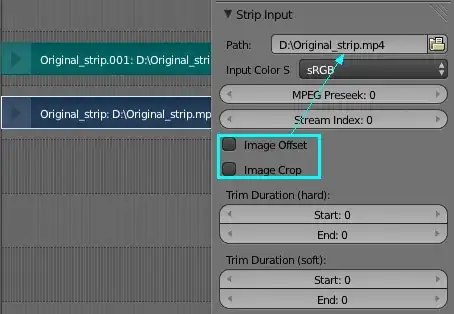
Actually, the normal crop and offset only work with the same strip that shown in the same panel.

enter image description here

However, you can add an Transform effect strip, it will work despite of resolution difference between proxy and original strip. Just be sure to have Transform strip selected. (Select the original strip, then ShiftA > Effect Strip... > Transform)

enter image description here

Leon Cheung
  • 27,718
  • 11
  • 89
  • 161
  • Will try that, but I have a feeling that it will not work. I enabled offset on original strip only to stop it from being stretched to fill the output frame. And by adding that to transform strip I think original one will get stretched again (before transform will get to work on it), thus entirely defeating the reason why I enabled "offset" in first place. – elmo Nov 13 '13 at 08:16
  • 1
    I know, that's why I always prefer to only use Transform strip for such tweaking, especially when using with proxy. Just simply copy and paste the crop/offset value from original strip to the transform strip. and uncheck or clear those settings on the original one. – Leon Cheung Nov 13 '13 at 08:51
  • "Just simply copy and paste the crop/offset value from original strip". There is no crop/offset on original strip, so I am not sure what I should copy. Just adding transform and enabling offset makes no difference. Aspect ratio is screwed. Also note my strips have different ratios and there is a lot of them, so I'd need a script/plugin to use that in a sensible manner. – elmo Nov 13 '13 at 23:48
  • @elmo, I see your point. It indeed seem strange that weird things happen once you toggle it no matter what value it used. To be honest, I don't know if it is normal. However, in my opinion, There are two separate panels you should notice -- "Effect Strip" and "Strip Input". You would also notice that when using proxy preview, the Original Dimension for the strip is also switched to the actual proxy size, as shown in the Effect Strip panel. – Leon Cheung Nov 14 '13 at 02:42
  • @elmo, continue to the last comment: But the Crop / Offset toggles are indeed located in another panel called "Strip input", which probably means: toggling them means that you dicided to use the size of original strip input, not the effect strip (now the proxy one). – Leon Cheung Nov 14 '13 at 02:43
  • @elmo continue: Sadly, you were still using proxy size for the preview, I think that can explain what you are facing. The reason why I suggest Transform is that it only effect the actual strip, no matter the size it is being of. Hope you can understand that. If you do, just simply leave the Crop/Offset on the original one untoggled. :) – Leon Cheung Nov 14 '13 at 03:01
  • However, your third image made me thinking that you were using an improper dimension or aspect ratio setting in Render Panel. Try Menu > Strip > Set Render Size, before everything. – Leon Cheung Nov 14 '13 at 03:21
  • I am using correct render size. It is what I want. And I want to crop+scale everything to match it (I have strips of different ratios).
  • The only way I can think of making it work currently is to use transform to get proper aspect ratio for each strip and work from there. But this means I need to learn Blendr API to create simple plugin to do that. Surely not going to do it by hand for over 100 strips. I was hoping there is some out of the box feature or I am missing something.
  • – elmo Nov 14 '13 at 08:34
  • Well, in that case, you may group all your strips as a Metastrip, then add a single Transform for that metastrip. However, if each of them got different aspect ratio, I don't think there is any automatic way to do this, since blender cannot guess what aspect ratio you really want for each single strip, right? – Leon Cheung Nov 14 '13 at 11:48
  • It knows original size, so it can. I will probably end up scripting something (or trying to find something someone else scripted). – elmo Nov 14 '13 at 12:22
  • Maybe there is something misunderstood. Sorry can't help you. – Leon Cheung Nov 14 '13 at 13:20
  • I'm pretty sure that this behavior was a bug, and is corrected in 2.74. Now the proxy fits the original screen dimensions which are not altered to suit proxy scale IIRC. – 3pointedit May 05 '15 at 04:21
  • @3pointedit I'm on 2.82 and I've got the same issue : I've got offsets & crops set in Strip properties, and when choosing the option to see Proxies in the scene they show up tiny. – Elias Dorneles Apr 02 '20 at 22:34