I am wondering if a feathered transparent sphere is possible to make in the internal Blender Render.
Currently I have this: 
Would it be possible to feather off the edges or make the sphere get more transparent as it gets to the edges? Thanks.
I am wondering if a feathered transparent sphere is possible to make in the internal Blender Render.
Currently I have this:
Would it be possible to feather off the edges or make the sphere get more transparent as it gets to the edges? Thanks.

You can do this with a Fresnel node or a Layer Weight node. Both these nodes give higher values (close to 1.0) at grazing angles and lower values 0.0 straight on, and thus can be used to mix in pure transparency towards the edge of your sphere.

The difference between the two is the interpolation curve. The Fresnel node uses the Fresnel function, which is technically meant for defining amounts of glossy reflection but still often gives pleasing gradients. The Layer Weight's Facing output uses a linear gradient from straight on to grazing angles.
To use this to control the transparency as you want, mix a pure white transparent shader with your colored transparent shader and plug the Fresnel or Layer Weight into the Mix Shader's Fac input. The above result used the layer weight node, like the following nodes.
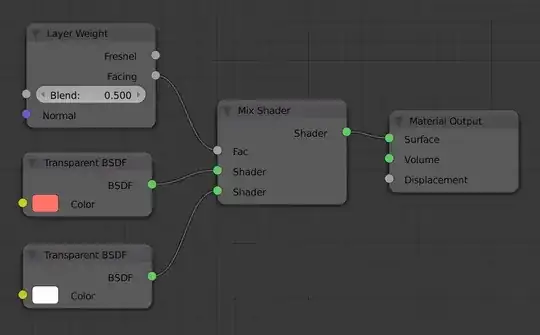
Though Blender Internal has no specific Layer Weight or Fresnel node, you can make one from scratch with a little bit of vector math. Just use it to control the alpha of the output node.
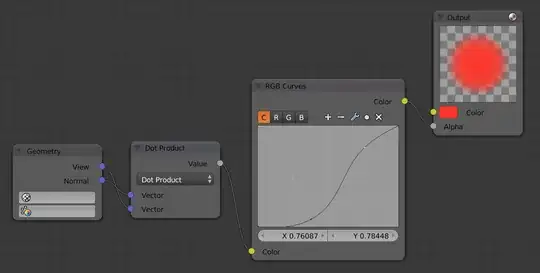
This uses a Converter > Vector Math node to take the dot product of the View vector and the Normal vector. Here I have also added an RGB Curves node to adjust the falloff curve manually.

