In blender, after I press F12 to render, the view changes. Is there a button or key that I can press to go back to the 3d view?
Asked
Active
Viewed 7.1k times
21


3 Answers
24
A completed render doesn't hog the memory on your computer anymore. To get back to the 3D View from the Image Editor window, either press Esc, F11, or just change the view.

I'm surprised nobody else answered it using the most simple way of changing viewport windows. :P

rioforce
- 2,042
- 2
- 22
- 34
-
1I've found that you can either press
ESC(always takes you to 3d view orF11(toggles render view). #blender2-77 – Jacksonkr Dec 20 '16 at 23:03 -
A note for macOS users, F11 toggles view desktop, so just escape works here. – Ron E Apr 12 '17 at 16:11
5
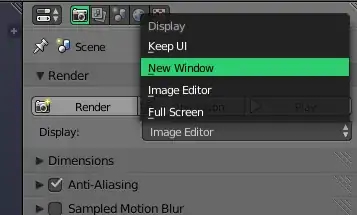
Pressing Esc should do this by default and in addition to WChargin's answer, another way about this is to go to the Render context in the Properties panel and under Render, change Display to New Window. This will have your renders appear in a separate window, one that you can close without exiting Blender or switching views.

-
"without ... switching views" yeah, but you have to switch windows. I find F11 quicker than Alt-Tab, and it doesn't interfere with my workflow as much: if I switch from Blender to the Render Result and then to Chrome, a single Alt-Tab will take me back to the Render Result, and then I need two to get back to Blender... this is stuff I don't want to have to think about! xD – wchargin Nov 07 '13 at 06:02
-
@WChargin Who said anything about shortcuts ;). For a new user learning Blender, I would like to think having a separate window (that you can close without the risk of losing everything) can be useful if not less confusing than having your viewport switch to an image. – iKlsR Nov 07 '13 at 06:05
-
2
Shift + F5can be used to quickly jump to the 3D view from any editor. – Greg Zaal Nov 07 '13 at 08:08
2
I assume you're asking about returning to the model view after seeing a render.
Usually, pressing Esc will do the trick.
If this doesn't work, try F11, or Window > Show/Hide Render View.
If this still doesn't work, you can do the following:
- Save the file.
- Open the default file (Ctrl+N for a new file).
Open the old file without the Load UI setting checked in the Open Blender File window. This will reload the file with the default user interface:


Escape. – gandalf3 Nov 07 '13 at 03:28