15

I need to load some COLLADA files into a program that does not support any transformations (because it does not support scaling). I want to export these objects from a .blend file.

Is there a way to apply the transformations directly on the mesh vertex data in blender before exporting the objects to .dae?

An example:

Scale(2,2) * triangle{(0,0), (0,1), (1,1)} => triangle{(0,0), (0,2), (2,2)}
CodeManX
  • 29,298
  • 3
  • 89
  • 128
Uli Holtmann
  • 445
  • 2
  • 4
  • 10
  • 3
    What about Ctrl+A > Apply? – gandalf3 Nov 02 '13 at 01:06
  • I'm very inexperienced with Blender, so I really don't know what I'm doing here. It looks better now, but still a bit off. The exported transformations do not equal the identity matrix. They still contain translations although I checked location, rotation and scale. Any advice? – Uli Holtmann Nov 02 '13 at 01:14
  • Finally, after applying them via the dropdown menu, everything works fine. Thanks a lot! You really saved me some hours of work :-) – Uli Holtmann Nov 02 '13 at 01:20
  • Enabling in the tool panel or in the F6 menu works for me.. Are you using the latest 2.69 release? – gandalf3 Nov 02 '13 at 01:40
  • I'm using 2.67 (will update asap) and checking the "Apply Object Transform"s resulted in the error mentioned above (translations weren't removed). CTRL + A and applying the transformations one after another works fine. – Uli Holtmann Nov 02 '13 at 01:55

1 Answers1

18

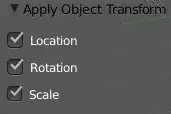
You can do this with CtrlA> Apply, then checking the transforms you want to apply with F6 or in 3D View > Tool shelf (N) > Redo menu:

enter image description here

gandalf3
  • 157,169
  • 58
  • 601
  • 1,133