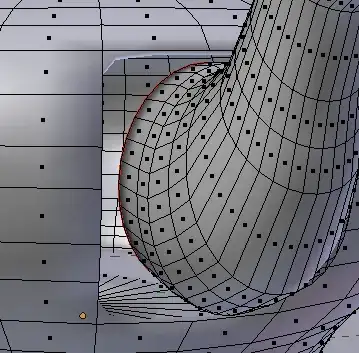
In this case the solidify and the subsurf modifier don't really contribute to the problem, and the texture on the surface is also incidental (ie, not relevant).
The main issue is really the abrupt 'non-transition' between the spout and the body. In your case because the object is Lathe-able geometry (you either used a screw modifier or the Spin tool) you could redo the body with more steps to have finer grained geometry for matching up.
You had a considerable difference in the size of polygons between the body and the spout and that makes it difficult to match up nicely, this image shows a better match between polygon sizes.

Getting the two patches of mesh to match up in a way that would make the merge smooth is not a trivial thing in a polygon modelling tool like Blender. Getting them to approach the same subdivision level is a firs step, but is no guarantee that the end result will be acceptable for close up renders. Regardless it is worth trying.
Blender has all kinds of tools to help you model intricate details
'Vertex Slide'. Shift+V, allows you to move a vertex along any connected edge.
'Knife Project' tool to cut shapes into meshes. Here i've cut the profile of the spout into the Body of the pot to prepare the attempt to merge. (the blue outline of the cutter-mesh is just a Draw Over to help distinguish the meshes involved, it's not part of the tool..)

if you look carefully, this shows the first sign of something we don't want to see. Ngons.

Now you have two problems, how do you match them up?

As soon as you see hideous geometry like this, you know you are going to have a bad time.

Even a bevel here will still give unfavourable results, but it may be one realistic way to get an acceptable transition. Adding an EdgeSplit modifier or Subsurf modifier on-top can smooth it out enough to be acceptable for everything except close-ups.

There are entire tools/software dedicated to dealing with mesh intersections like this. (Groboto, MeshMixer..to name just a few)
(sorry more to come, hence i'm adding this as community wiki I encourage additional editing)
 HDR "03-19_Night_B" CC BY-ND 4.0 | Scratch Texture CC BY-NC 2.0


 Then extrude, scale, move to complete the mesh as desired.