0

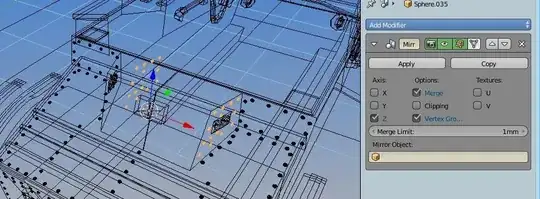
I am still fighting with mirroring. Doesnt matter if I use Ctrl+M or Mirror modifier. My rivets go only in bad way. I mean I want them mirrored nicely along global axis to fit the opposite site. BUT the rivets are mirroring only along local transformations corresponding their base slope face.

Check the screenshots: mirroring along X axis mirroring along Z axis
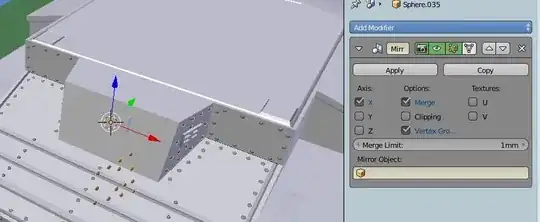
From pictures you can see that rivets want to be mirrored in the face direction they were created at. I used Snapping during transform (magnet icon) on the face and I had applied "Align rotation with the snapping target".

On the other faces it all worked fine, as you can ssee they are mirrored properly. But this last face which is not perpendicular doesn't work for me. What do I wrong? Thanks !

I must also say, that If I change GLobal transforamtion to local, or gimbal or whatever the result is still the same !

It behaves like it is a bug there?... Please help Karel

Karel
  • 1
  • 1
  • Try to use an empty as a mirror object. – Denis Mar 24 '15 at 20:57
  • I have it empty .. Sorry, dont understand – Karel Mar 24 '15 at 21:03
  • From the picture you posted I don't see that you used it in your mirror modifier. – Denis Mar 24 '15 at 21:05
  • Well, I chose the object the rivets are and the mirrored mesh is aligned in the rigth line, but still moved to far from the pivot point, What with this? – Karel Mar 24 '15 at 21:28
  • Choose the empty as mirror object that is located in the center, not the cylinders. – Denis Mar 24 '15 at 21:42
  • Or apply rotation on your object using CTRL+A and choose rotation, that should solve your problem. – Denis Mar 24 '15 at 21:46
  • and can you more explain why is ctrl+A requested? Why is it not automaticly done? Seems to have a lot of work to apply rotation for each rivet I will move to the slope faces... – Karel Mar 24 '15 at 22:34
  • Because if you do not apply the rotation the mirror operation will be done relative to origin of the object, local coordinates, thats what you had in the beginning, or you can use a different object as mirror coordinates, as I mentioned before, usually empties are used for that. – Denis Mar 24 '15 at 23:26
  • Here is more detailed information about mirror modifier: http://blender.stackexchange.com/questions/10882/mirror-modifier-is-not-working-no-mirrored-object – Denis Mar 25 '15 at 00:57

0 Answers0