While @Chris' answer is a good direction, it only partially answers your question.
Since I know your concern a bit more, I couldn't help but write an answer to it as well.
I really tried to keep it as lean as possible this time.

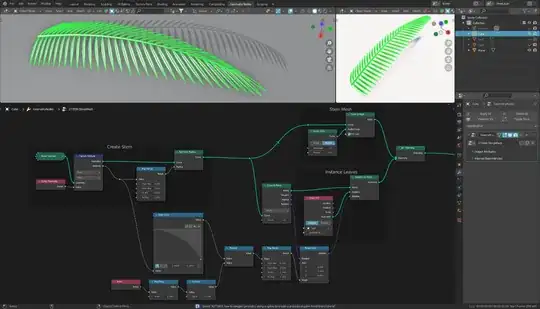
First I capture the Spline Factor on the points of the curve.
I then map this with Map Range to a specific range, which I set as the radius for the curve points. These radii serve me later to let the stem become thinner towards the end.
I also use the same factor to define the rotation, because towards the tip the leaves should be more rotated.
With Curve to Points I define the resolution of the curve. At the resulting points the leaves are instantiated.
With the node Float Curve I create a soft curve, which serves me as a basis for the rotation.
But to make sure that every second leaf is rotated in the opposite direction at every second point, I use the index of the points together with the math node Ping-Pong to create a variation. You can also use the Math-Node Modulo here instead.
With this, each point now alternately gives me $0$ or $1$. If I subtract $0.5$ from this, I have the alternating values $-0.5$ and $0.5$, which I multiply with the factor driven values of the Float Curve. I can then use the node Map Range to bring the obtained values into another number range. As values for To Min and To Max I use angles (In Radians!).
As basis for the rotation I use the value Rotation which I get from the node Curve to Points. This rotation lets the leaves follow the stem.
If I now add the previously created angles to this rotation with Rotate Euler, exactly the rotation is created that is needed for the instantiation.

(Blender 3.1+)


