6

There's a clip in the Blender 2013 demo reel that consists of a fly-through of a paper cut-out model. (32 seconds in)

I'd like to have a go at recreating that look. Does anybody have any tips? What are the characteristics that make it instantly recognizable as paper? Is it a subtle texture on the paper itself? Is it the hand-drawn outlines on the edges? Or is it something else, such as the indoor lighting or the focal length?

gandalf3
  • 157,169
  • 58
  • 601
  • 1,133
Isvara
  • 195
  • 7
  • 1
    I would say it is a combination of all those things. Are you looking for tips on how to create those effects? – gandalf3 Aug 20 '13 at 18:38
  • 4
    Related - http://blender.stackexchange.com/questions/362/how-to-add-roughness-to-a-surface-using-modifiers – iKlsR Aug 20 '13 at 18:46
  • @gandalf3 I'm an ambitious (almost) beginner, so I'll absorb any tips you have on any of that. – Isvara Aug 20 '13 at 22:00
  • 1
    @Derecho For tips on how to create those individual effects, you will probably be best off asking about each one in an individual question. – gandalf3 Aug 21 '13 at 02:56

2 Answers2

7

My thoughts:

  • Every surface must contain a paper texture, even of only slightly visible.
  • Make the paper look a little used (dirt, coffee stains, bit crumbled up, more hints)
  • Light the place as if it was miniature (soft shadows, big lights)
  • Focus as if it was macro (blurry background)
  • When drawing on the paper, use near-real pencil.
  • Cycles - definitely use cycles for this.
  • Freestyle is not a must, but can help.
  • Extra help is small dust particles on the ground and flying around.

I think the strong point of that video is realistic lighting: very varied sources and realistic bouncing, warm temperature. Also it doesn't stay on too long, I bet you can get a better result if you try!

krivar
  • 671
  • 5
  • 13
3

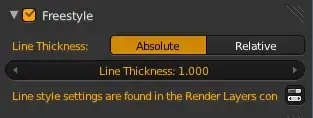
It seems that the look is mostly influenced by the outlines, you could achieve something similar by using freestyle.

You can enable freestyle in the render tab:

enter image description here

In the render layer tab you find several options to control freestyle

enter image description here

A nice blog post on freestyle

stacker
  • 38,549
  • 31
  • 141
  • 243