0

blend file:

As you can see in the video, the cube doesn't just rotate on the one axis. It's rotating on all 3 and doing all kinds of other things I didn't want. Someone pls explain this. Please check out the file

Here is the 35 sec video: https://youtu.be/icvjRebNCLo

just a skimmed down gif enter image description here

Gorgious
  • 30,723
  • 2
  • 44
  • 101
AlexWillis21
  • 789
  • 3
  • 15
  • maybe this will help? https://blender.stackexchange.com/questions/129834/how-do-i-rotate-an-object-along-its-own-axis-windmill – moonboots Aug 23 '21 at 15:09
  • I have set 2 empties already. There is a box around the cube and the xyz empty for a cube rotation further into the animation. Here is how it still just doesn't act right. I did the quatrnion thing, and it dips down, acting weird still. https://ibb.co/nM5myJx – AlexWillis21 Aug 23 '21 at 15:34
  • maybe show with some drawings what you want to do as simple as possible so that people propose some solutions? – moonboots Aug 23 '21 at 15:37
  • I'm sorry, your right, I should have explained what I was seeing in my head. It will rotate on the edge forward and then the final rotation to flip the cube into a solved state. https://ibb.co/Dtsy5D6 – AlexWillis21 Aug 23 '21 at 15:49
  • If I had to do a series of rotations for the cube I would keyframe so that it works fine visually. The other solution is probably to use a hierarchy of empties: the cube is the child of an empty that is child of empty that is child of empty, etc, and they are the successive rotation axis of your cube – moonboots Aug 23 '21 at 15:55
  • move on the keyframe then in the rotations delete single keyframe on the axises that you dont like to rotate . if i understand the problem – MohMehdi Aug 23 '21 at 16:45
  • @mma78 I did remove the other key frames for the other axis, but it looks even worse when I do that :( – AlexWillis21 Aug 23 '21 at 18:01
  • @moonboots I didn't know I could stack empties one on top of the other. Does it cap out on how many times you can parent empties to each other? – AlexWillis21 Aug 23 '21 at 18:03
  • I don't think there's any limit. The other way may be to use the Child Of constraint so that the cube changes parent every time it needs to rotate, a bit tedious though. Have you tried to create keyframes visually? – moonboots Aug 23 '21 at 18:32
  • @AlexWillis21 yeah it doesnt work just with your setup becauze there is already rotation for that empty , if you have just one axis to rotate then reseting the empty rotations and rotating along for example x would work , but now there is a gimbal lock you can check for yourself turn the gizmo for oriantation on and click gimbal it happens on second keyframe , you can use quaternions which solves the problem or use another eulers . its a bit complicated and i dont understand it but for many axis rotations use quaternion and for simple ones use euler – MohMehdi Aug 23 '21 at 19:14

1 Answers1

2

view gimbal

turn this checkboxes to see gimbal lock
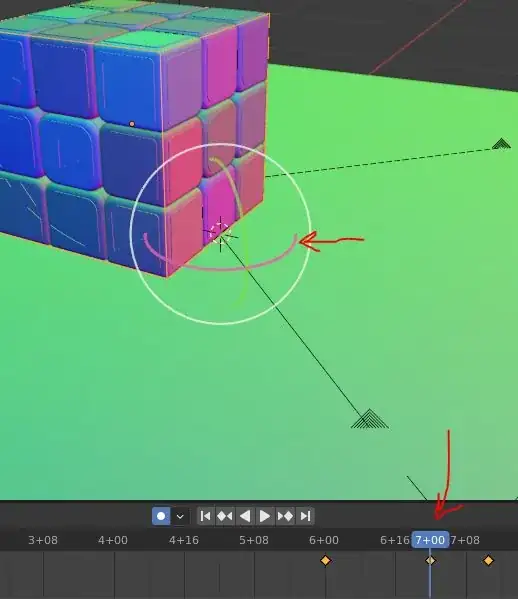
lock found

as you can see x and z axis are aligned and this will make wired looking motions between key frames

fix

here is a fix

you can also reset the rotation of the empty by applying the rotation and rotate just in one axis for this example but if you are not using the values there just change the rotation mode to quaternion
also about gimbal lock watch this

basically Euler is easy to understand as a human but it has its limits for how it works . for example in rigging you would use different versions of the Euler for different bones to avoid gimbal lock and also limiting the bones for rotating in such ways that make things go wrong and also be easy to use and understand as animator

MohMehdi
  • 480
  • 2
  • 11