 I am poly modeling a head and I was wondering if there was a shortcut to insert poly's into this blank space.
I have tried watching video tutorials but I dont see anything useful.
I am poly modeling a head and I was wondering if there was a shortcut to insert poly's into this blank space.
I have tried watching video tutorials but I dont see anything useful.
Asked
Active
Viewed 357 times
1

Joseph Martinez
- 41
- 2
- 4
-
2hello, what do you mean by "insert poly's into this blank space"? – moonboots Sep 22 '20 at 17:48
2 Answers
3
Assuming Both sides that you want to connect have the same amount of vertices.
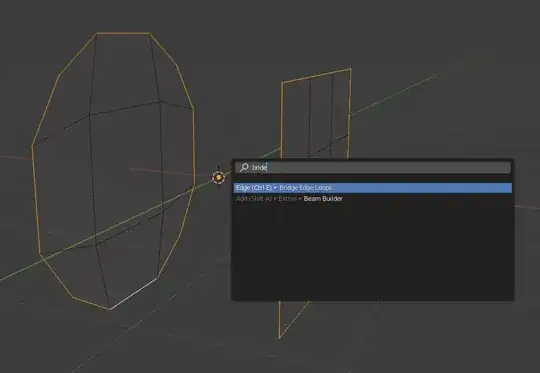
Step 1: select both edges like shown in image 1.
Step 2: Use "Bridge Edge Loops" (available in the edge menu (ctrl+e) or through the search function (F3 or space depending settings))
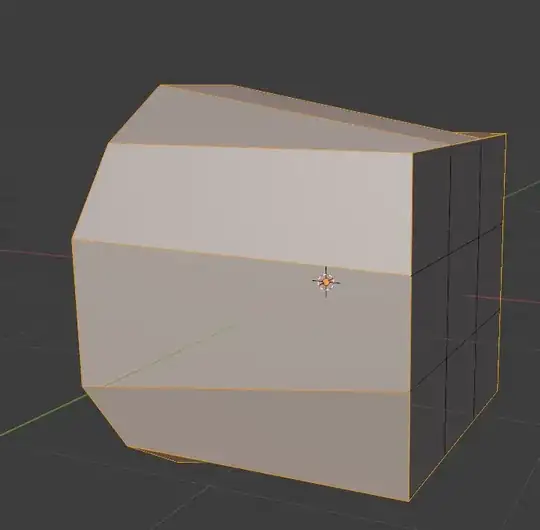
Step 3: Check for any problems


Joeyflodder
- 483
- 2
- 12
2
There is an add on included called F2. You need to go to Edit > Preferences >Add-ons and turn it on, with this you can select for example, 2 edges and press F to create a new polygon. Not sure if that's what you are looking for, but, here is an example (minute 1:29) :https://youtu.be/q1fEtys-RII?t=89

Emir
- 5,701
- 1
- 14
- 31
-
1Hello :). Just to clarify, it works even without the F2 addon, it's a basic Blender functionality. – jachym michal Sep 22 '20 at 18:02